Use this path when you want to configure the AI Traffic worker entirely in the Cloudflare dashboard—no Wrangler or terminal steps. The worker runs at the edge, detects AI bots and AI referrals, and sends lightweight beacons to SearchMention while shoppers still see your normal storefront.
Before you start
Quick checklist—then follow the numbered steps below.
- Cloudflare in front of your store. The hostname shoppers use must be DNS-proxied (orange cloud) in the same Cloudflare account where you create this Worker.
-
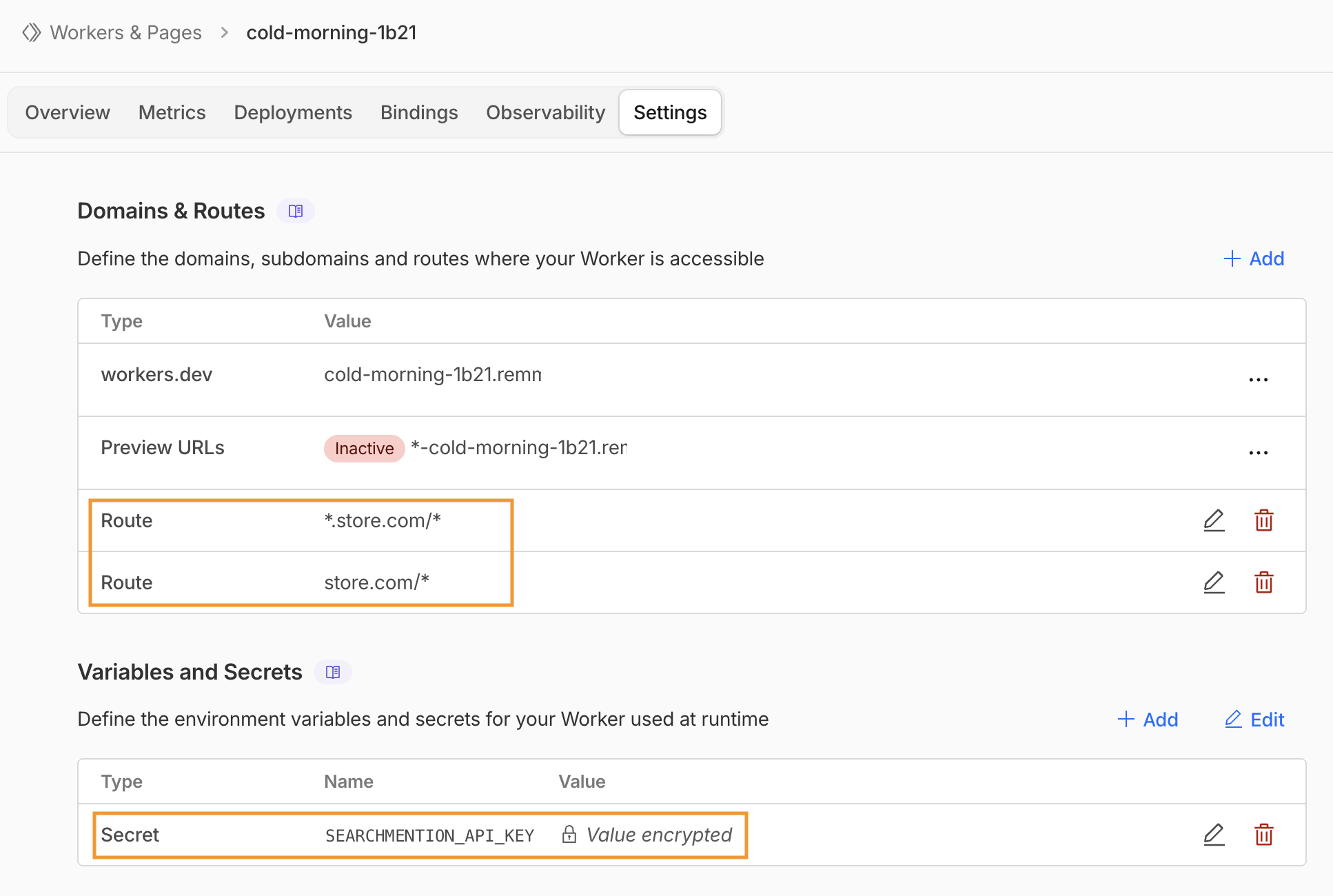
Storefront routes. You’ll wire hostnames to this Worker in step 4—most stores need both
yourstore.com/*and*.yourstore.com/*. -
API key. An
sm_live_…key from SearchMention Dashboard → Settings for the project that should receive AI Traffic for this store (plan limits apply). -
Worker script. Copy
worker.jsfrom the block below (same file ascloudflare-worker/worker.jsin this repository).
1 Create and deploy a starter Worker
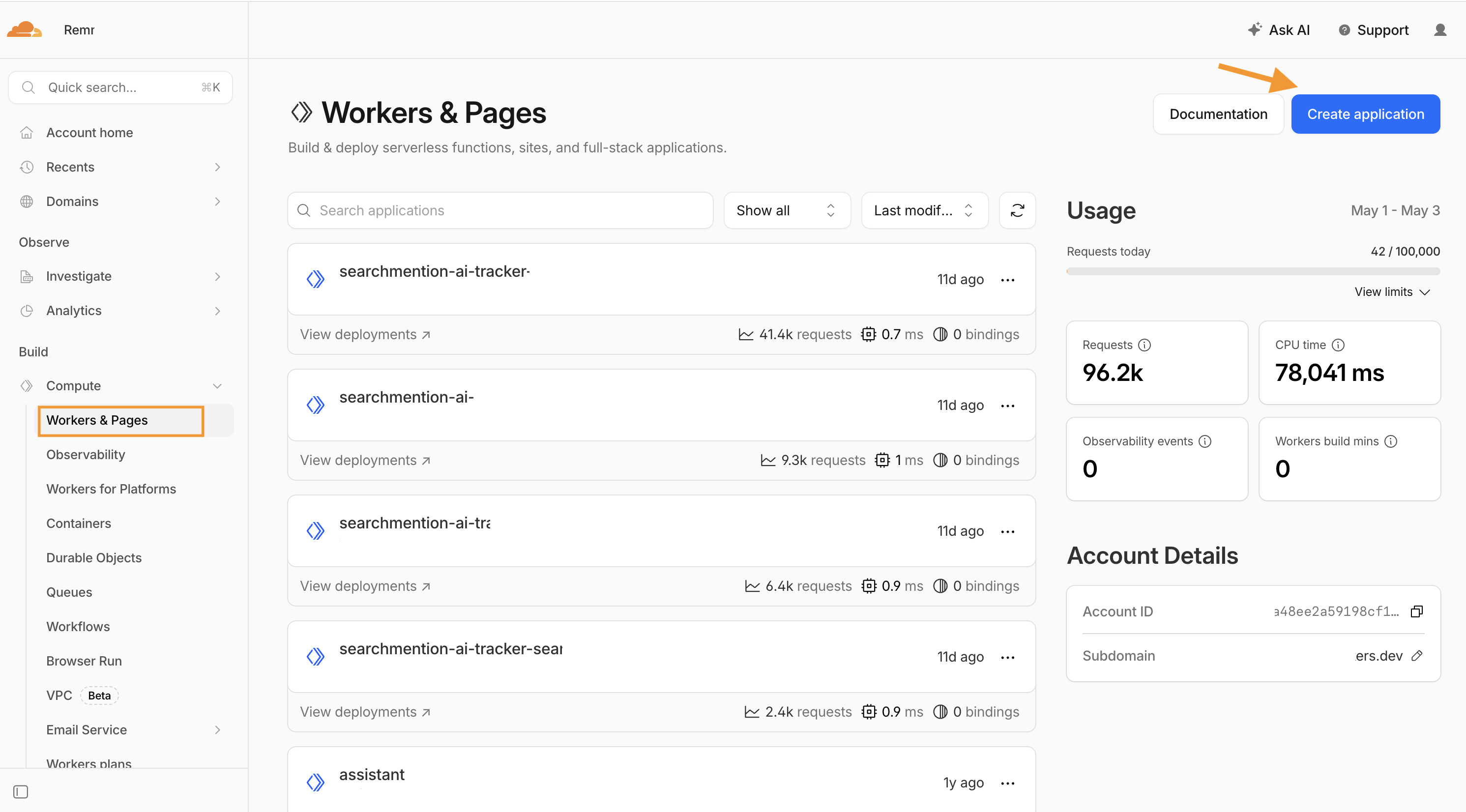
In the Cloudflare dashboard, open Workers & Pages from the sidebar (under Build), then click Create application (top right).
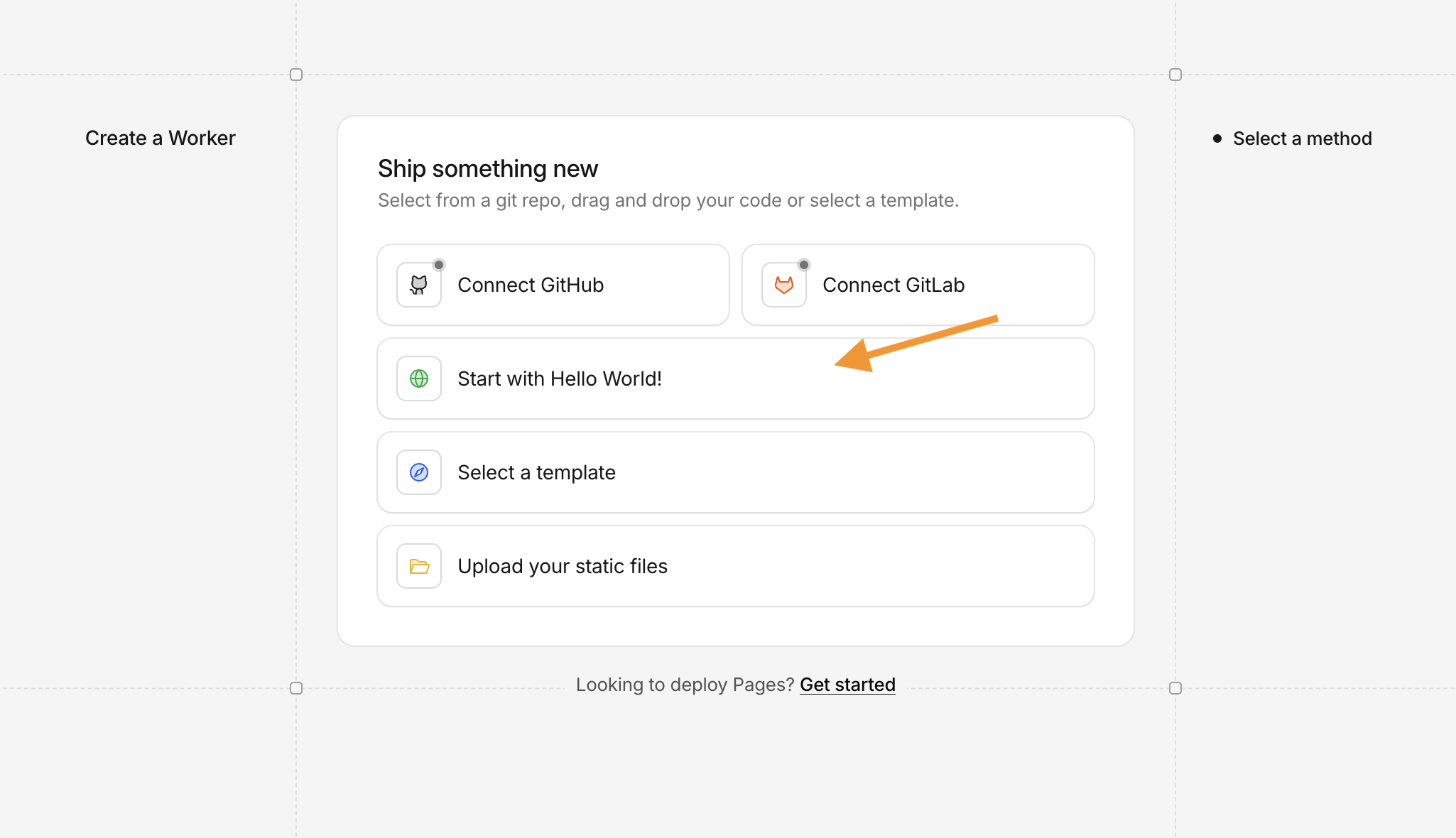
When asked how to begin, pick Start with Hello World! to use Cloudflare’s starter template.
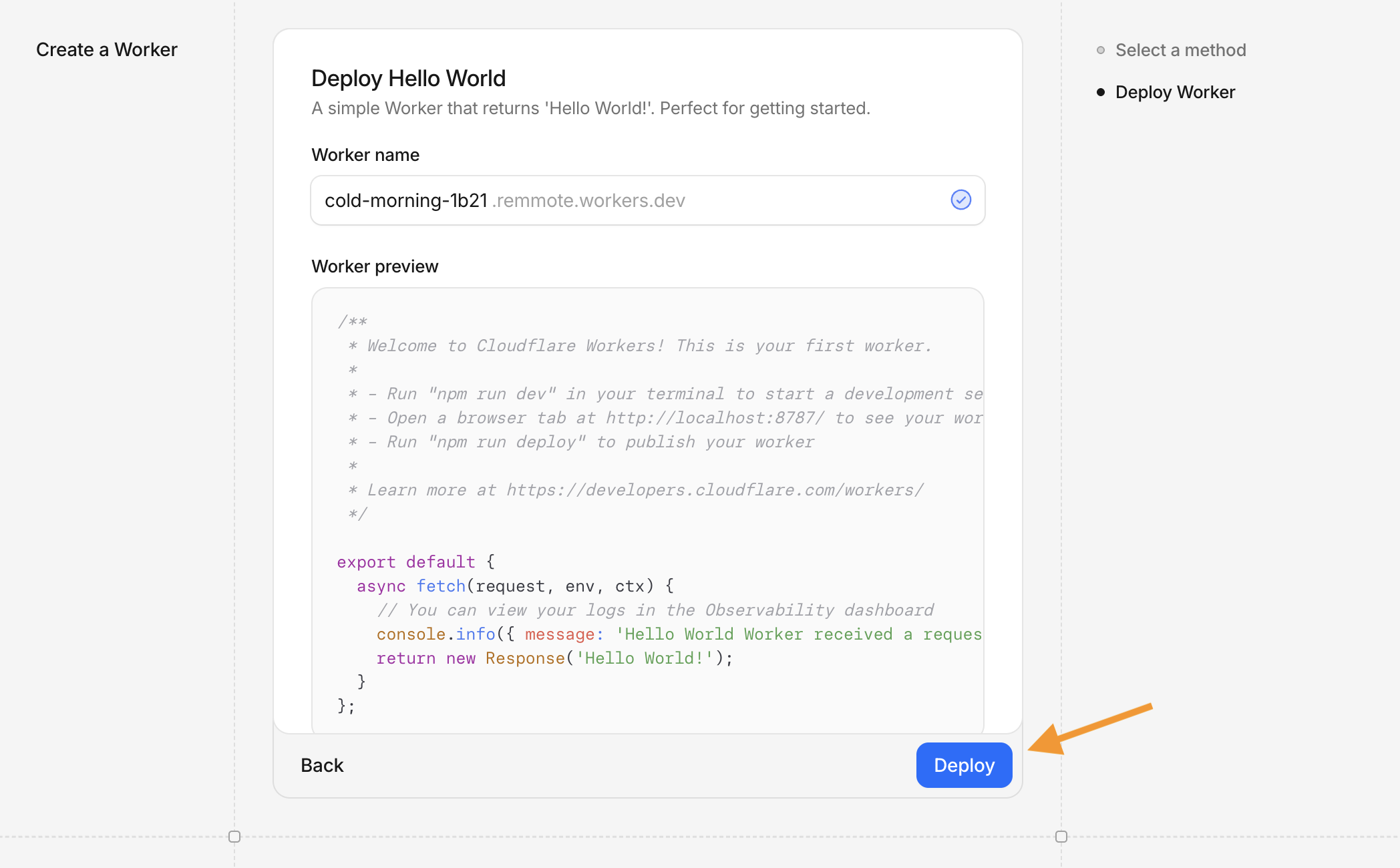
On the Deploy Hello World screen you only choose a Worker name and click Deploy. This step does not open the full code editor—you’re just publishing the starter so the Worker exists on workers.dev. You’ll open Edit code in step 2, then paste SearchMention’s script in step 3.
2 Open the code editor
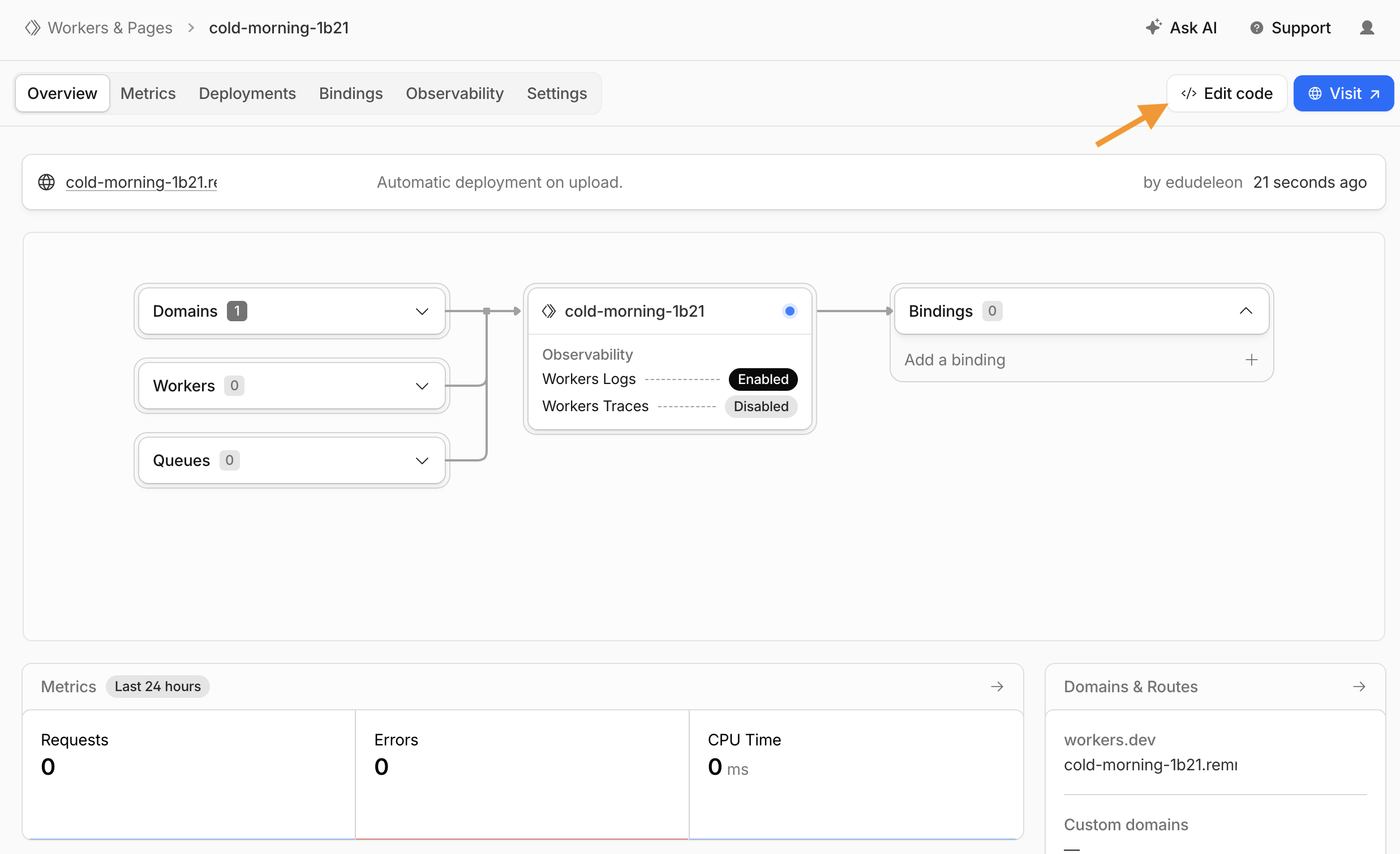
From your Worker’s Overview, click Edit code. That opens the full dashboard IDE—you can’t replace the whole script from the Deploy Hello World screen in step 1.
3 Paste worker.js and deploy
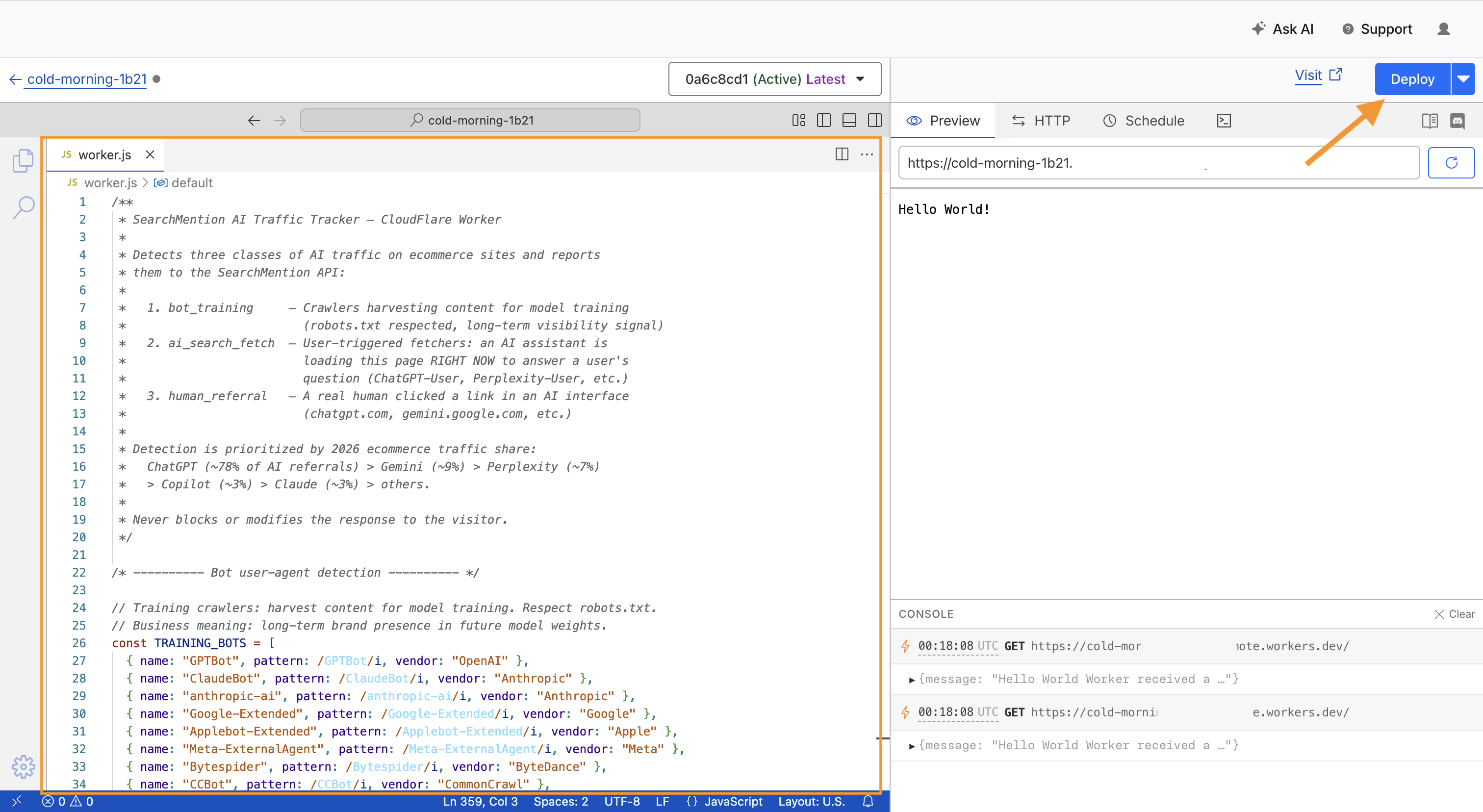
In the editor’s worker.js tab, select all existing code and replace it with SearchMention’s script — use Copy worker.js in the block below (same file as cloudflare-worker/worker.js). Then click Deploy in the editor toolbar. Until you add the secret in a later step, the Worker may not successfully call the API—that’s expected until SEARCHMENTION_API_KEY exists.
worker.js — copy entire file
Copy the script, paste into the Cloudflare editor, then Deploy.
/**
 * SearchMention AI Traffic Tracker — CloudFlare Worker
 *
 * Detects three classes of AI traffic on ecommerce sites and reports
 * them to the SearchMention API:
 *
 *   1. bot_training     — Crawlers harvesting content for model training
 *                         (robots.txt respected, long-term visibility signal)
 *   2. ai_search_fetch  — User-triggered fetchers: an AI assistant is
 *                         loading this page RIGHT NOW to answer a user's
 *                         question (ChatGPT-User, Perplexity-User, etc.)
 *   3. human_referral   — A real human clicked a link in an AI interface
 *                         (chatgpt.com, gemini.google.com, etc.)
 *
 * Detection is prioritized by 2026 ecommerce traffic share:
 *   ChatGPT (~78% of AI referrals) > Gemini (~9%) > Perplexity (~7%)
 *   > Copilot (~3%) > Claude (~3%) > others.
 *
 * Never blocks or modifies the response to the visitor.
 */

/* ---------- Bot user-agent detection ---------- */

// Training crawlers: harvest content for model training. Respect robots.txt.
// Business meaning: long-term brand presence in future model weights.
const TRAINING_BOTS = [
  { name: "GPTBot", pattern: /GPTBot/i, vendor: "OpenAI" },
  { name: "ClaudeBot", pattern: /ClaudeBot/i, vendor: "Anthropic" },
  { name: "anthropic-ai", pattern: /anthropic-ai/i, vendor: "Anthropic" },
  { name: "Google-Extended", pattern: /Google-Extended/i, vendor: "Google" },
  { name: "Applebot-Extended", pattern: /Applebot-Extended/i, vendor: "Apple" },
  { name: "Meta-ExternalAgent", pattern: /Meta-ExternalAgent/i, vendor: "Meta" },
  { name: "Bytespider", pattern: /Bytespider/i, vendor: "ByteDance" },
  { name: "CCBot", pattern: /CCBot/i, vendor: "CommonCrawl" },
  { name: "Amazonbot", pattern: /Amazonbot/i, vendor: "Amazon" },
  { name: "cohere-ai", pattern: /cohere-ai/i, vendor: "Cohere" },
  { name: "DeepSeekBot", pattern: /DeepSeek(?!.*User)/i, vendor: "DeepSeek" },
];

// Search/retrieval crawlers and user-triggered fetchers.
// Business meaning: immediate visibility in AI answers. For ecommerce,
// these hits often correlate with "AI agent is shopping on behalf of a user".
const SEARCH_FETCH_BOTS = [
  // OpenAI
  { name: "ChatGPT-User", pattern: /ChatGPT-User/i, vendor: "OpenAI" },
  { name: "OAI-SearchBot", pattern: /OAI-SearchBot/i, vendor: "OpenAI" },
  // Anthropic
  { name: "Claude-User", pattern: /Claude-User/i, vendor: "Anthropic" },
  { name: "Claude-SearchBot", pattern: /Claude-SearchBot/i, vendor: "Anthropic" },
  // Google
  { name: "Google-CloudVertexBot", pattern: /Google-CloudVertexBot/i, vendor: "Google" },
  { name: "Google-NotebookLM", pattern: /Google-NotebookLM/i, vendor: "Google" },
  { name: "GoogleAgent-Mariner", pattern: /Google-Agent|GoogleAgent|Mariner/i, vendor: "Google" },
  // Perplexity
  { name: "PerplexityBot", pattern: /PerplexityBot/i, vendor: "Perplexity" },
  { name: "Perplexity-User", pattern: /Perplexity-User/i, vendor: "Perplexity" },
  // Meta
  { name: "Meta-ExternalFetcher", pattern: /Meta-ExternalFetcher/i, vendor: "Meta" },
  // Microsoft / Mistral / DuckDuckGo
  { name: "DuckAssistBot", pattern: /DuckAssistBot/i, vendor: "DuckDuckGo" },
  { name: "MistralAI-User", pattern: /MistralAI-User|Mistral-User/i, vendor: "Mistral" },
  { name: "DeepSeek-User", pattern: /DeepSeek-User/i, vendor: "DeepSeek" },
];

/* ---------- Human referral detection ---------- */

// Ordered by 2026 ecommerce referral share. ChatGPT first = fastest exit
// path for the majority of real AI traffic.
const AI_REFERRER_DOMAINS = [
  {
    name: "ChatGPT",
    // Covers chatgpt.com, chat.openai.com, and the Atlas browser's
    // in-chat origin (chatgpt.com/c/...)
    domains: ["chatgpt.com", "chat.openai.com", "chatgpt.openai.com"],
  },
  {
    name: "Gemini",
    // gemini.google.com is the chat surface. google.com AI Mode appears
    // with gemini or AI-specific query params but comes from google.com,
    // so we handle that via UTM fallback below rather than blanket-match
    // google.com (which would false-positive regular Google organic).
    domains: ["gemini.google.com"],
  },
  {
    name: "Perplexity",
    domains: ["perplexity.ai", "www.perplexity.ai"],
  },
  {
    // Microsoft surfaces. copilot.microsoft.com is Copilot end-to-end. Bing
    // is mostly normal web search, so we only attribute to Copilot when the
    // referrer URL path is a known Copilot/Chat surface (matched explicitly
    // below in detectAiReferrer — bare bing.com host does NOT count).
    name: "Copilot",
    domains: [
      "copilot.microsoft.com",
      { host: "www.bing.com", pathPrefix: "/chat" },
      { host: "bing.com", pathPrefix: "/chat" },
      { host: "www.bing.com", pathPrefix: "/copilot" },
      { host: "bing.com", pathPrefix: "/copilot" },
    ],
  },
  {
    name: "Claude",
    domains: ["claude.ai", "www.claude.ai", "claude.com"],
  },
  {
    name: "Meta-AI",
    domains: ["meta.ai", "www.meta.ai"],
  },
  {
    name: "Grok",
    domains: ["grok.com", "www.grok.com", "x.ai", "grok.x.ai"],
  },
  {
    name: "DeepSeek",
    domains: ["chat.deepseek.com", "deepseek.com"],
  },
  {
    name: "Mistral",
    domains: ["chat.mistral.ai"],
  },
];

// Build a hostname -> [{ platform, pathPrefix? }] lookup once per worker
// isolate. Multiple rules per host are supported (e.g. www.bing.com has
// two Copilot path prefixes); strings (no path constraint) win immediately.
const REFERRER_HOST_INDEX = (() => {
  const index = new Map();
  const push = (host, rule) => {
    const key = host.toLowerCase();
    if (!index.has(key)) index.set(key, []);
    index.get(key).push(rule);
  };
  for (const platform of AI_REFERRER_DOMAINS) {
    for (const domain of platform.domains) {
      if (typeof domain === "string") {
        push(domain, { platform: platform.name });
      } else if (domain && typeof domain.host === "string") {
        push(domain.host, {
          platform: platform.name,
          pathPrefix: domain.pathPrefix
            ? domain.pathPrefix.toLowerCase()
            : undefined,
        });
      }
    }
  }
  return index;
})();

// UTM fallback: when a real human clicks an AI link, the referrer header
// is often stripped (mobile apps, in-app browsers, no-referrer policy).
// ChatGPT, Perplexity, and Gemini frequently append utm_source tags.
// Treat these as a weaker signal — separate visit_type so downstream can
// distinguish confirmed referrers from inferred ones.
const UTM_SOURCE_MAP = new Map([
  ["chatgpt.com", "ChatGPT"],
  ["chatgpt", "ChatGPT"],
  ["openai", "ChatGPT"],
  ["perplexity.ai", "Perplexity"],
  ["perplexity", "Perplexity"],
  ["gemini.google.com", "Gemini"],
  ["gemini", "Gemini"],
  ["google_ai_mode", "Gemini"],
  ["copilot.microsoft.com", "Copilot"],
  ["copilot", "Copilot"],
  ["claude.ai", "Claude"],
  ["claude", "Claude"],
  ["meta.ai", "Meta-AI"],
  ["grok", "Grok"],
  ["x.ai", "Grok"],
]);

/* ---------- Detection functions ---------- */

function detectBot(userAgent) {
  if (!userAgent) return null;
  for (const bot of SEARCH_FETCH_BOTS) {
    if (bot.pattern.test(userAgent)) {
      return { name: bot.name, vendor: bot.vendor, category: "ai_search_fetch" };
    }
  }
  for (const bot of TRAINING_BOTS) {
    if (bot.pattern.test(userAgent)) {
      return { name: bot.name, vendor: bot.vendor, category: "bot_training" };
    }
  }
  return null;
}

function detectAiReferrer(referer) {
  if (!referer) return null;
  try {
    const url = new URL(referer);
    const host = url.hostname.toLowerCase();
    const path = (url.pathname || "/").toLowerCase();
    const rules = REFERRER_HOST_INDEX.get(host);
    if (!rules) return null;
    for (const rule of rules) {
      if (!rule.pathPrefix || path.startsWith(rule.pathPrefix)) {
        return { platform: rule.platform, host };
      }
    }
    return null;
  } catch (_) {
    return null;
  }
}

function detectUtmAiSource(url) {
  try {
    const u = new URL(url);
    const source = (u.searchParams.get("utm_source") || "").toLowerCase().trim();
    if (!source) return null;
    const platform = UTM_SOURCE_MAP.get(source);
    return platform ? { platform, raw: source } : null;
  } catch (_) {
    return null;
  }
}

/* ---------- Noise filter (referrals only) ---------- */

// Scanner / probe paths that fake a "https://www.bing.com/" referer to
// look like organic traffic. Bot UAs bypass this filter — a GPTBot hit on
// /sitemap.xml is still meaningful crawl data.
const NOISE_PATH_PREFIXES = [
  "/wp-login",
  "/wp-admin",
  "/wp-includes",
  "/xmlrpc.php",
  "/.env",
  "/.git",
  "/sitemap",
  "/robots.txt",
  "/feed",
  "/rss",
  "/cgi-bin",
  "/phpmyadmin",
];

const NOISE_PATH_EXTENSIONS = [
  ".js", ".mjs", ".css", ".map",
  ".png", ".jpg", ".jpeg", ".gif", ".webp", ".svg", ".ico", ".bmp",
  ".woff", ".woff2", ".ttf", ".eot", ".otf",
  ".mp4", ".webm", ".ogg", ".mp3", ".wav",
  ".pdf", ".zip", ".gz", ".tar",
  ".json", ".xml", ".txt",
];

function isReferralNoise(requestUrl, statusCode) {
  let path = "/";
  try {
    path = (new URL(requestUrl).pathname || "/").toLowerCase();
  } catch (_) {
    return false;
  }
  for (const prefix of NOISE_PATH_PREFIXES) {
    if (path.startsWith(prefix)) return true;
  }
  for (const ext of NOISE_PATH_EXTENSIONS) {
    if (path.endsWith(ext)) return true;
  }
  if (typeof statusCode === "number" && statusCode >= 400) return true;
  return false;
}

/* ---------- Bot noise filter ---------- */

// Credential probes + static assets. Kept in sync with `bot_noise` in
// config/ai-bots.php; the API repeats the check, this just saves egress.
// Deliberately omits .xml / .txt so /sitemap.xml, /robots.txt, /llms.txt stay.
const BOT_NOISE_PATH_PREFIXES = [
  "/.env",
  "/.git",
  "/.aws",
  "/.ssh",
  "/.vscode",
  "/.idea",
  "/.docker",
  "/.npmrc",
  "/.htpasswd",
  "/.ds_store",
  "/wp-login",
  "/wp-admin",
  "/wp-includes",
  "/wp-content/plugins",
  "/xmlrpc.php",
  "/phpmyadmin",
  "/pma",
  "/adminer",
  "/cgi-bin",
  "/vendor/phpunit",
  "/config.json",
  "/credentials",
  "/secrets",
  "/backup.sql",
  "/dump.sql",
  "/server-status",
  "/actuator",
  "/telescope/requests",
];

const BOT_NOISE_PATH_EXTENSIONS = [
  ".js", ".mjs", ".css", ".map",
  ".png", ".jpg", ".jpeg", ".gif", ".webp", ".svg", ".ico", ".bmp",
  ".woff", ".woff2", ".ttf", ".eot", ".otf",
  ".mp4", ".webm", ".ogg", ".mp3", ".wav",
  ".pdf", ".zip", ".gz", ".tar",
  ".json",
];

function isBotNoise(requestUrl) {
  let path = "/";
  try {
    path = (new URL(requestUrl).pathname || "/").toLowerCase();
  } catch (_) {
    return false;
  }
  if (BOT_NOISE_PATH_PREFIXES.some((prefix) => path.startsWith(prefix))) {
    return true;
  }
  return BOT_NOISE_PATH_EXTENSIONS.some((ext) => path.endsWith(ext));
}

/* ---------- In-isolate dedupe ---------- */

// Best-effort dedupe inside a single worker isolate. Cloudflare runs many
// isolates per colo so this is not global — the API has its own cache-based
// dedupe across all sources. This just trims the most obvious bursts (the
// same scanner hammering one origin from one IP within a few seconds).
const DEDUPE_TTL_MS = 10_000;
const DEDUPE_MAX_ENTRIES = 5_000;
const DEDUPE_CACHE = new Map();

function shouldDedupe(ip, userAgent, requestUrl) {
  if (!ip) return false;
  let path = "/";
  try {
    path = new URL(requestUrl).pathname || "/";
  } catch (_) {
    /* ignore */
  }
  const key = `${ip}|${userAgent}|${path}`;
  const now = Date.now();
  const seenAt = DEDUPE_CACHE.get(key);
  if (seenAt !== undefined && now - seenAt < DEDUPE_TTL_MS) {
    return true;
  }
  if (DEDUPE_CACHE.size >= DEDUPE_MAX_ENTRIES) {
    // Cheap eviction: drop the oldest entry. Map iteration order is insertion.
    const oldestKey = DEDUPE_CACHE.keys().next().value;
    if (oldestKey !== undefined) DEDUPE_CACHE.delete(oldestKey);
  }
  DEDUPE_CACHE.set(key, now);
  return false;
}

/* ---------- Privacy ---------- */

// Bot traffic comes from operator datacenter ranges, not from people, so there
// is nothing to anonymize — and the full address is required to check the hit
// against the operator's published CIDRs, which are mostly /28 or narrower. A
// /24-truncated address can never match those, which would leave every bot
// permanently unverifiable. Human referrals stay truncated.
function ipForReporting(ip, isBot) {
  if (!ip) return { value: null, truncated: false };
  if (isBot) return { value: ip, truncated: false };

  return { value: anonymizeIp(ip), truncated: true };
}

// Truncate IPv4 to /24 and IPv6 to /64. This is the standard approach
// for GDPR-compliant analytics — preserves geographic signal while
// removing user identifiability.
function anonymizeIp(ip) {
  if (!ip) return null;
  if (ip.includes(".")) {
    const parts = ip.split(".");
    if (parts.length === 4) return `${parts[0]}.${parts[1]}.${parts[2]}.0`;
    return null;
  }
  if (ip.includes(":")) {
    const parts = ip.split(":");
    // First 4 hextets = /64
    return parts.slice(0, 4).join(":") + "::";
  }
  return null;
}

/* ---------- Debug helpers ---------- */

function isDebugEnabled(env) {
  const v = env.SEARCHMENTION_DEBUG;
  return v === "1" || v === "true" || v === "yes";
}

function debugLog(env, message, detail) {
  if (!isDebugEnabled(env)) return;
  if (detail !== undefined) {
    console.log("[searchmention-ai-tracker]", message, detail);
  } else {
    console.log("[searchmention-ai-tracker]", message);
  }
}

/* ---------- Reporting ---------- */

async function reportVisit(env, request, response, detection) {
  const endpoint =
    env.SEARCHMENTION_ENDPOINT || "https://searchmention.com/api/v1/visits";
  const apiKey = env.SEARCHMENTION_API_KEY;
  if (!apiKey) {
    debugLog(env, "beacon skipped: SEARCHMENTION_API_KEY is not set");
    return;
  }

  // Optional sampling — useful when a client gets a viral spike and
  // you don't want to hammer the API. Value is 0..1, default 1 (report all).
  const sampleRate = parseFloat(env.SEARCHMENTION_SAMPLE_RATE || "1");
  if (sampleRate < 1 && Math.random() > sampleRate) {
    debugLog(env, "beacon skipped: sampled out", { sampleRate });
    return;
  }

  const userAgent = request.headers.get("user-agent") || "";
  const rawIp = request.headers.get("cf-connecting-ip") || null;

  const isBot =
    detection.visit_type === "bot_training" ||
    detection.visit_type === "ai_search_fetch";
  const ip = ipForReporting(rawIp, isBot);

  const cf = request.cf || {};
  // Cloudflare's own verified-bot signal, when the zone plan exposes it.
  // Advisory only: the API's CIDR check against published ranges is what
  // decides the stored verdict.
  const verifiedBot =
    cf.verifiedBotCategory !== undefined
      ? Boolean(cf.verifiedBotCategory)
      : cf.botManagement && cf.botManagement.verifiedBot !== undefined
        ? Boolean(cf.botManagement.verifiedBot)
        : null;

  const payload = {
    visits: [
      {
        url: request.url,
        user_agent: userAgent,
        visit_type: detection.visit_type,
        platform: detection.platform || null,
        bot_name: detection.bot_name || null,
        vendor: detection.vendor || null,
        referrer: detection.referrer || null,
        referrer_host: detection.referrer_host || null,
        method: request.method,
        status_code: response.status,
        ip_address: ip.value,
        ip_truncated: ip.truncated,
        edge_verified_bot: verifiedBot,
        country: cf.country || null,
        city: cf.city || null,
        visited_at: new Date().toISOString(),
        source: "cloudflare",
      },
    ],
  };

  // Abort the beacon if the API is slow — don't eat worker CPU on spikes.
  const controller = new AbortController();
  const timeout = setTimeout(() => controller.abort(), 3000);

  try {
    const res = await fetch(endpoint, {
      method: "POST",
      headers: {
        "Content-Type": "application/json",
        Authorization: `Bearer ${apiKey}`,
      },
      body: JSON.stringify(payload),
      signal: controller.signal,
    });
    if (isDebugEnabled(env)) {
      const bodyPreview = await res.text();
      debugLog(env, "beacon response", {
        status: res.status,
        visitType: detection.visit_type,
        platform: detection.platform,
        body: bodyPreview.slice(0, 300),
      });
    }
  } catch (err) {
    debugLog(env, "beacon fetch failed", String(err && err.message ? err.message : err));
  } finally {
    clearTimeout(timeout);
  }
}

/* ---------- Main handler ---------- */

export default {
  async fetch(request, env, ctx) {
    // Kick off the origin fetch immediately — detection runs in parallel
    // so we don't add latency to the visitor's response.
    const responsePromise = fetch(request);

    const userAgent = request.headers.get("user-agent") || "";
    const referer = request.headers.get("referer") || "";

    const bot = detectBot(userAgent);
    const aiReferrer = !bot ? detectAiReferrer(referer) : null;
    const utmReferrer = !bot && !aiReferrer ? detectUtmAiSource(request.url) : null;

    let detection = null;
    if (bot) {
      detection = {
        visit_type: bot.category, // "ai_search_fetch" | "bot_training"
        platform: bot.vendor,
        bot_name: bot.name,
        vendor: bot.vendor,
      };
    } else if (aiReferrer) {
      detection = {
        visit_type: "human_referral",
        platform: aiReferrer.platform,
        referrer: referer,
        referrer_host: aiReferrer.host,
      };
    } else if (utmReferrer) {
      detection = {
        visit_type: "human_referral_utm",
        platform: utmReferrer.platform,
        referrer: null,
        referrer_host: null,
      };
    }

    debugLog(env, "request", {
      method: request.method,
      url: request.url,
      detection,
      userAgent: userAgent.slice(0, 200),
    });

    const response = await responsePromise;

    if (detection) {
      // Human/UTM referrals get filtered for scanner noise + obvious bursts so
      // we don't pollute the API with fake-Referer probes hitting /wp-login.
      // Bot rows skip credential probes and static assets (keeps /robots.txt
      // and /sitemap.xml). The API runs the same checks server-side; this just
      // saves egress + DB writes.
      const isReferral =
        detection.visit_type === "human_referral" ||
        detection.visit_type === "human_referral_utm";

      let drop = false;
      if (isReferral) {
        if (isReferralNoise(request.url, response.status)) {
          drop = true;
          debugLog(env, "drop: referral noise", {
            url: request.url,
            status: response.status,
          });
        } else if (shouldDedupe(request.headers.get("cf-connecting-ip"), userAgent, request.url)) {
          drop = true;
          debugLog(env, "drop: dedupe", { url: request.url });
        }
      } else if (isBotNoise(request.url)) {
        drop = true;
        debugLog(env, "drop: bot noise (probe or asset)", {
          url: request.url,
          botName: detection.bot_name,
        });
      }

      if (!drop) {
        ctx.waitUntil(reportVisit(env, request, response, detection));
      }
    }

    return response;
  },
};
4 Attach routes to your storefront
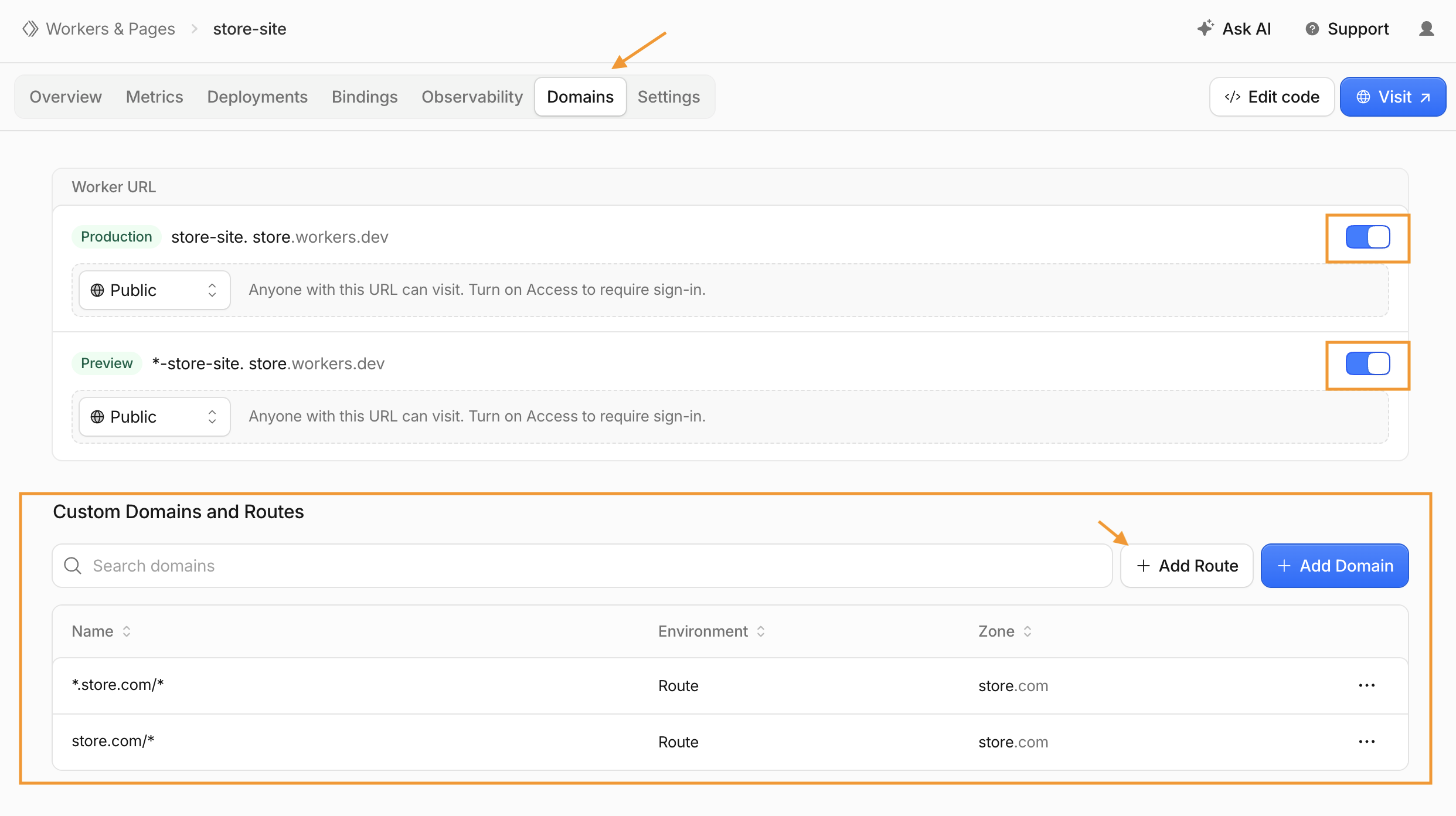
yourstore.com/* (apex) and *.yourstore.com/* (covers www and other subdomains). The apex pattern does not match subdomains, so one route alone leaves gaps. Visits are stored against the SearchMention project tied to your API key (step 5)—not by matching the visit URL’s host to a single saved domain in SearchMention.
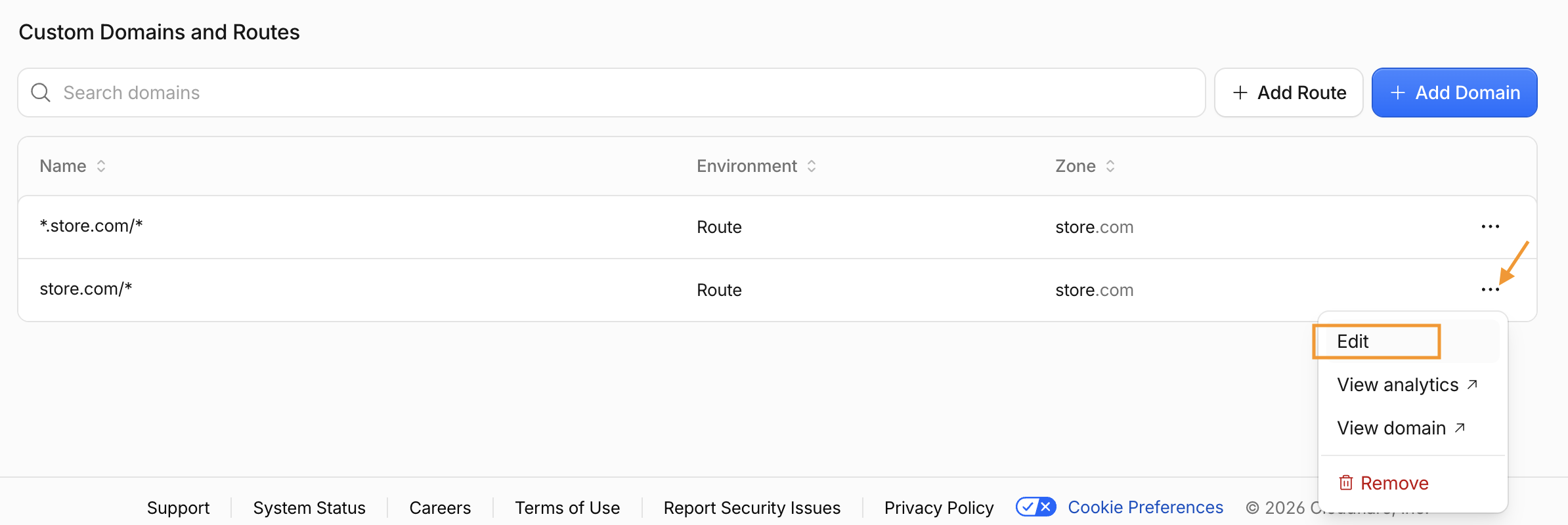
Open the Worker’s Domains tab (not Settings). Under Custom Domains and Routes, click + Add Route for each pattern—typically twice for the apex and wildcard pair above.
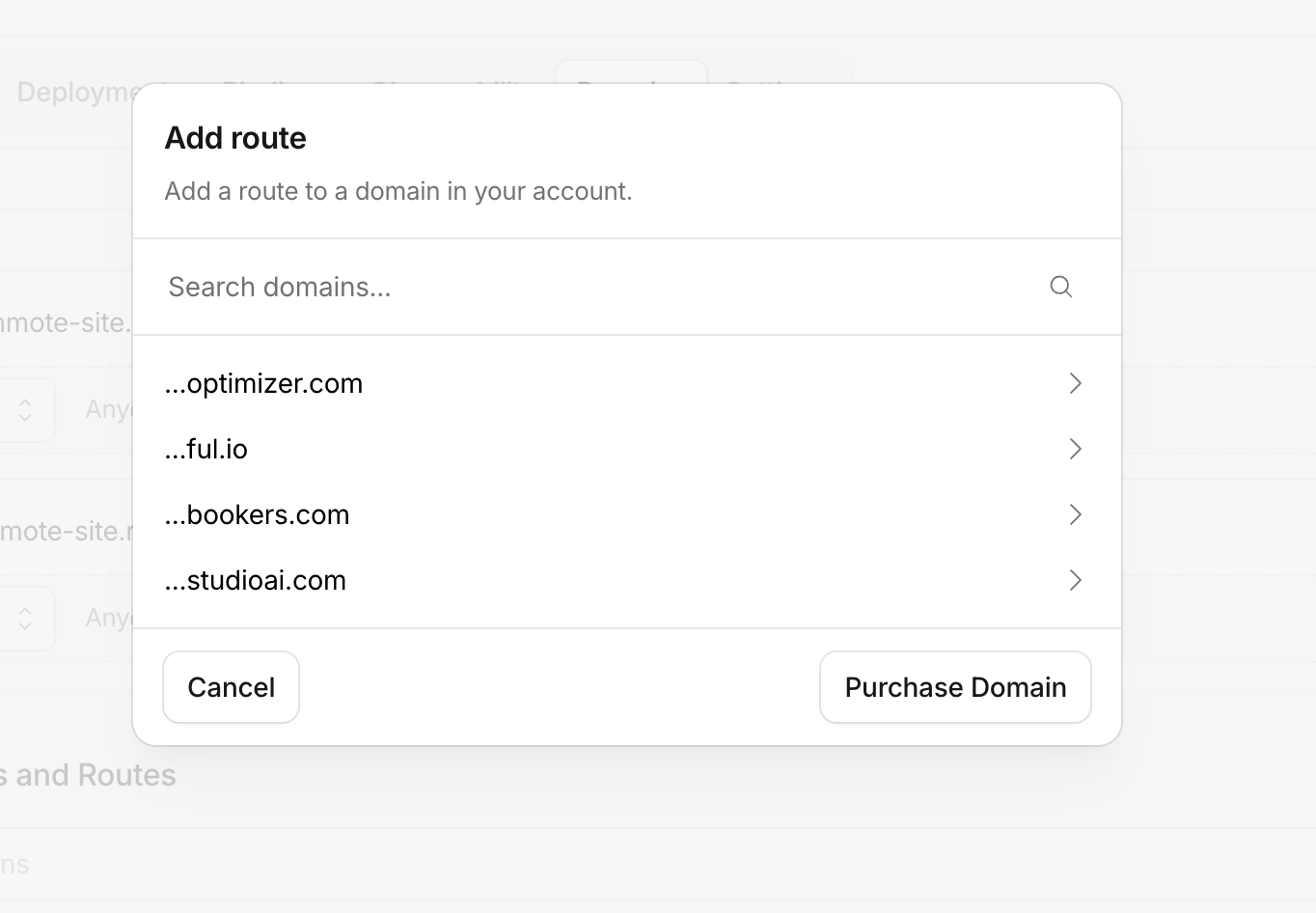
In the Add route dialog, pick the Cloudflare zone for your storefront (the domain in your account that shoppers use).
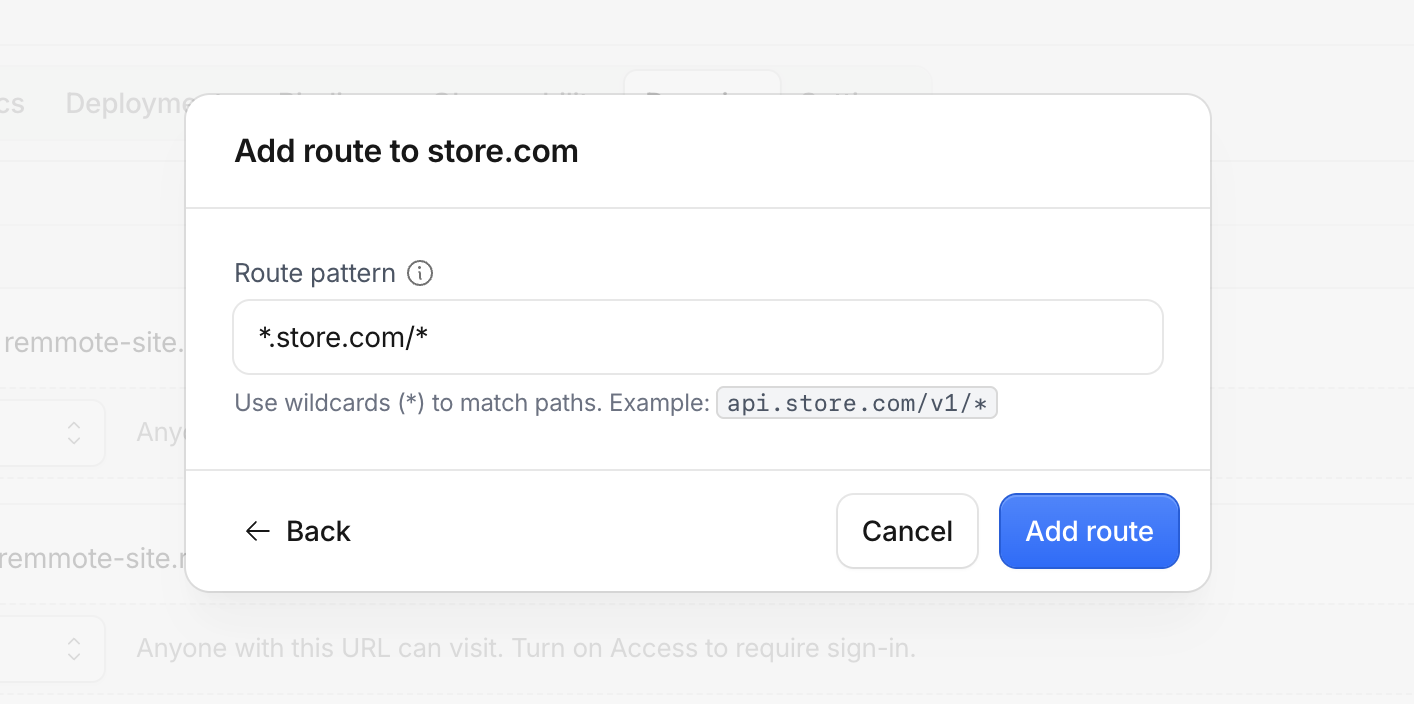
Enter the Route pattern (add yourstore.com/*, then repeat for *.yourstore.com/*), then click Add route.
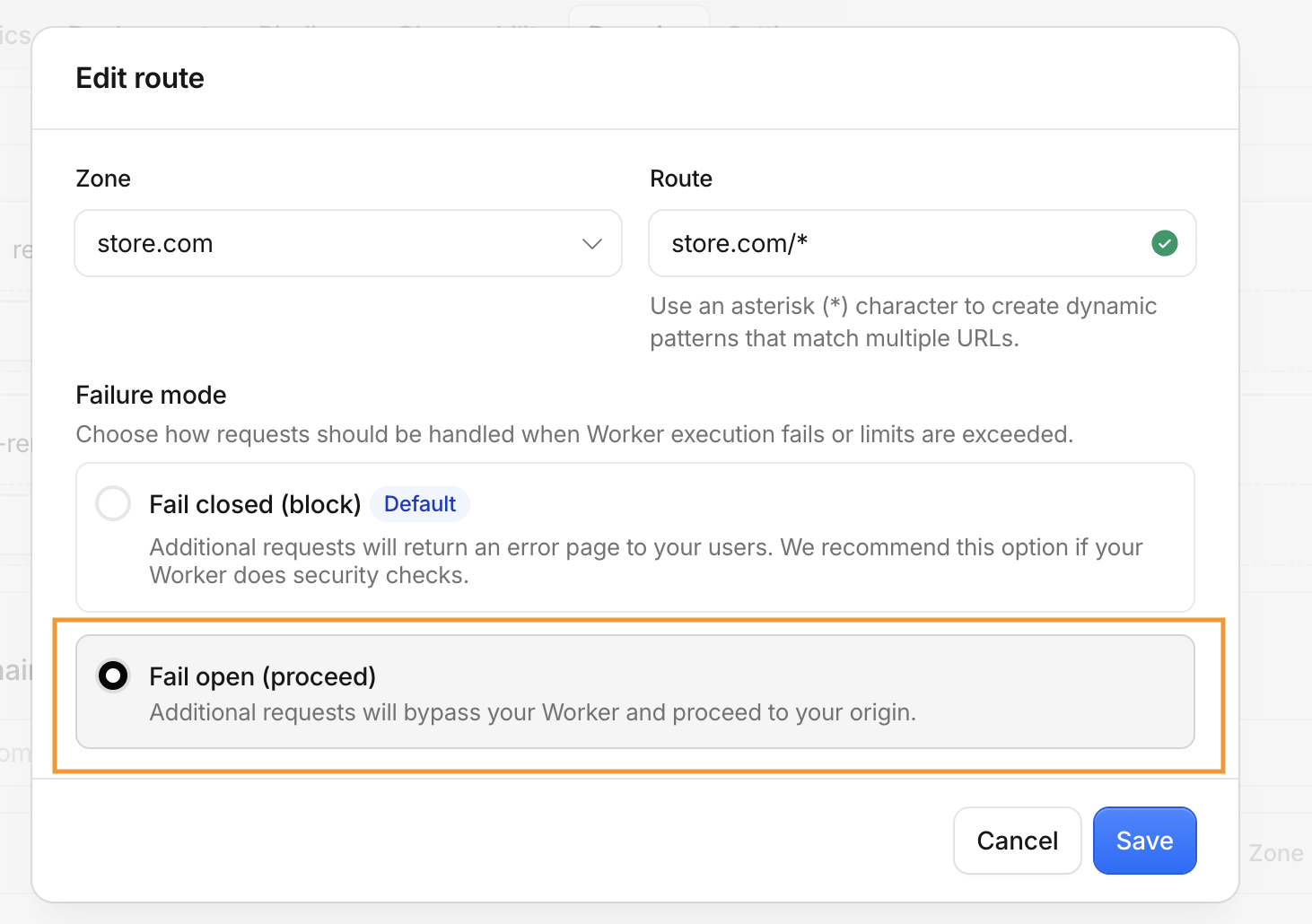
After a route is listed, open its ⋯ menu and choose Edit. Set Failure mode to Fail open (proceed), then Save. Do this for every storefront route you added.
5 Add your SearchMention API key
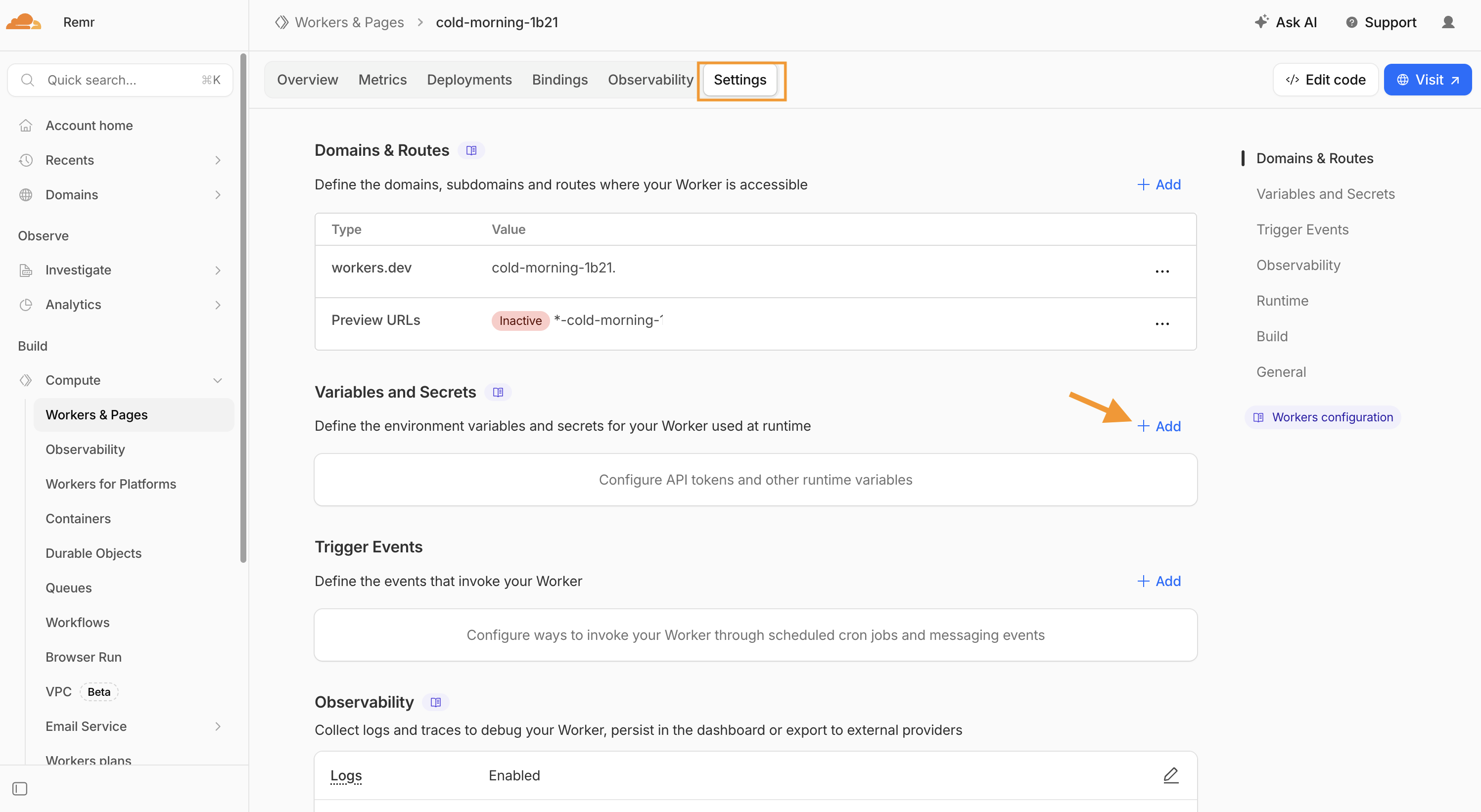
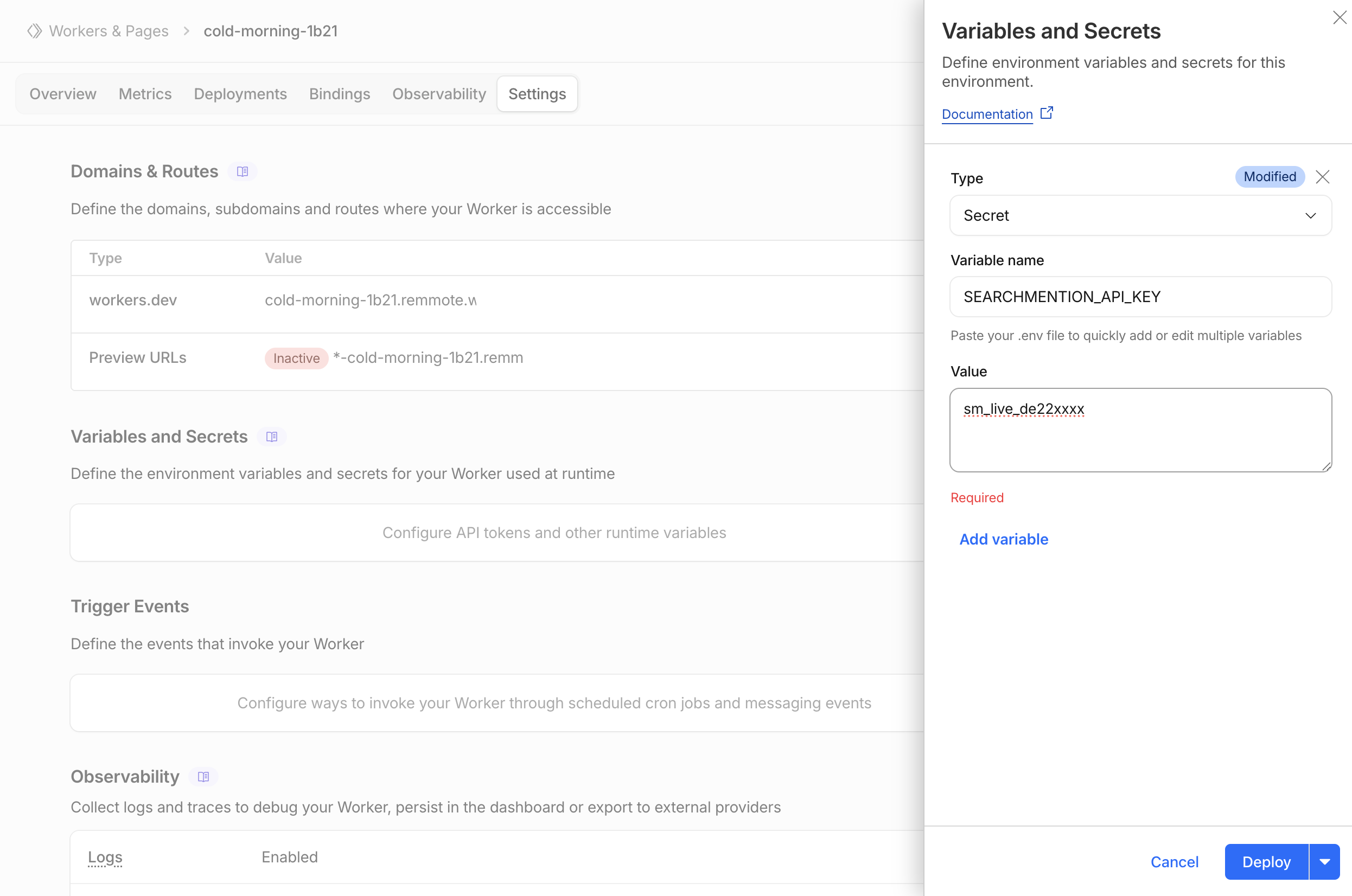
Open the Worker’s Settings tab, then Variables and Secrets, and click Add. Create a Secret named exactly SEARCHMENTION_API_KEY and paste your sm_live_… key as the value. Save with Deploy so the secret applies to the Worker.
6 Confirm and test
On the Domains tab, confirm the storefront routes you added. On Settings → Variables and Secrets, confirm SEARCHMENTION_API_KEY is saved as an encrypted secret. Then open Dashboard → AI Traffic in SearchMention: after real AI bot or referral traffic hits your routes, events appear for that project. Normal visitors alone won’t create rows—only matched bots, referrers, or allowed UTM hints.
utm_source=chatgpt in the query string—for example
https://www.yourstore.com/?utm_source=chatgpt
Replace yourstore.com with your storefront domain. This mimics traffic where the Referer header is missing but link tagging still identifies ChatGPT. utm_source=openai and utm_source=chatgpt.com are also recognized.
Troubleshooting
If the Worker is deployed and the API key looks correct but nothing shows in Dashboard → AI Traffic (or Worker logs stay empty when you click a test URL), work through these checks.
Just moved the domain to Cloudflare? Wait for DNS
After you change nameservers (or point records at Cloudflare), public resolvers often pick up the new IPs within minutes, but your browser, ISP, or OS may still cache the old origin address for hours. While that cache lasts, visits go straight to your server and never hit Cloudflare—so the Worker does not run, Real-time logs show nothing for your click, and SearchMention receives no beacon.
-
Confirm you’re on Cloudflare: open the storefront, DevTools → Network → pick the document request. Response headers should include
cf-ray(and usuallyserver: cloudflare). Nocf-raymeans that request bypassed Cloudflare. -
Speed up a retest: flush local DNS, try another network (e.g. phone on cellular), or an Incognito window after flushing. On macOS:
sudo dscacheutil -flushcache; sudo killall -HUP mDNSResponder. - DNS records must be proxied (orange cloud), not DNS-only (grey cloud). Grey-clouded hostnames resolve to your origin and skip Workers.
cf-ray appears, then retest /?utm_source=chatgpt.com with Worker logs open.
Routes, hostnames, and API key
- Most stores need two routes:
yourstore.com/*and*.yourstore.com/*(apex alone does not coverwwwor other subdomains). - Visits attach to the SearchMention project that owns the
SEARCHMENTION_API_KEYsecret—use the key from that project’s Settings, not another store. - Normal browsing without an AI bot UA, AI
Referer, or allowedutm_sourcedoes not create rows.
Optional: Worker debug logs
Under the Worker’s Settings → Variables and Secrets, add a plain text variable SEARCHMENTION_DEBUG with value 1 (or true). Open Logs / Real-time logs, then hit your test URL. You’ll see whether detection fired, whether a referral was dropped as noise, and the API beacon status. Turn the variable off when you’re done—debug logs every request.
detection: nullon a UTM test URL → request never matched (wrong host/route, or query string stripped before the Worker).drop: referral noise→ path or HTTP status looked like scanner/static noise (e.g. status ≥ 400).beacon skipped: SEARCHMENTION_API_KEY is not set→ secret missing or not deployed.- No log line at all for your click → traffic is not reaching this Worker (DNS/proxy/routes—see above).