How to Claim Your Business in ChatGPT Business Hub (2026 Guide)
We claimed SearchMention in OpenAI's new Business Hub the week it launched. Here is every screen, what each step asks for, and what the insights tell a small business once they show up.
See what ChatGPT says about you first
Business Hub counts mentions but never shows the questions. Our free check asks ChatGPT and Google questions your customers are likely to ask and shows whether you're mentioned, and who is named instead.
How do you claim your business on ChatGPT? Sign in to ChatGPT, open Business Hub, search for your business, and claim its listing or create one. Verify that you control it with a DNS record on your domain, your business phone, your business email or your Shopify store, then pass an identity check with Persona. Once OpenAI approves it, your profile gets a blue check, you can edit what ChatGPT shows about you, and you see how often ChatGPT cites your website and how many people click through. It's free.
OpenAI launched Businesses in ChatGPT in beta on November 10, 2026, pitched as a way to reach "the 1.2 billion people who use ChatGPT each week." It works much like Google Business Profile, with one big difference: businesses that only exist online can create a profile too. We claimed searchmention.com through the website path, and we use the insights from FotoBookers, a photographer booking site that uses SearchMention to track its AI visibility, to show what the numbers look like for a small site.
TL;DR
- Search before you create. ChatGPT may already have a listing for you; we found one for SearchMention.
- Pick how customers reach you: "Through a website" for online businesses (verified by a DNS TXT record), "At a physical location" for local ones (currently only existing US listings).
- The TXT record expires in about a day. If "Verify domain" fails at first, DNS usually just hasn't caught up yet.
- Your profile stays a draft until you pass Persona's ID check, which can also ask for a business document such as an IRS CP575 letter.
- Insights for a small site are real: FotoBookers showed 178 mentions and 17 website clicks in one week; GA4 counted 15 ChatGPT sessions over the same days.
- What it can't tell you: the questions, the answers, or who ChatGPT named instead of you.
Before you start: what you'll need
- A ChatGPT account you'll use to manage the profile. A free account works; you can invite teammates or an agency later, each with their own account.
- One way to prove control: access to your domain's DNS (Cloudflare, GoDaddy, Namecheap…), the business phone or business email on record, or admin access to your Shopify store.
- A government-issued ID and a phone with a camera for the identity check.
- A business document, in case Persona asks: a registration certificate or registry extract, a tax document, a VAT certificate, or in the US an IRS CP575 or 147C letter.
- Your legal name, address and registration or tax number, exactly as they appear on official records. OpenAI's setup guide says mismatches are the usual reason a check fails.
You don't need an ads account, a paid ChatGPT plan or an Enterprise agreement to claim a business.
How to claim your business, step by step
1. Open Business Hub and search for your business
Go to chatgpt.com/business-hub, or open Business Hub from the ChatGPT sidebar, and type your business name. When we searched "SearchMention," a listing already existed, right under the option to create a new one. If you see yours, select it and claim it rather than creating a duplicate. If there's no match, you'll see Create '[your name]' and "No matching business."
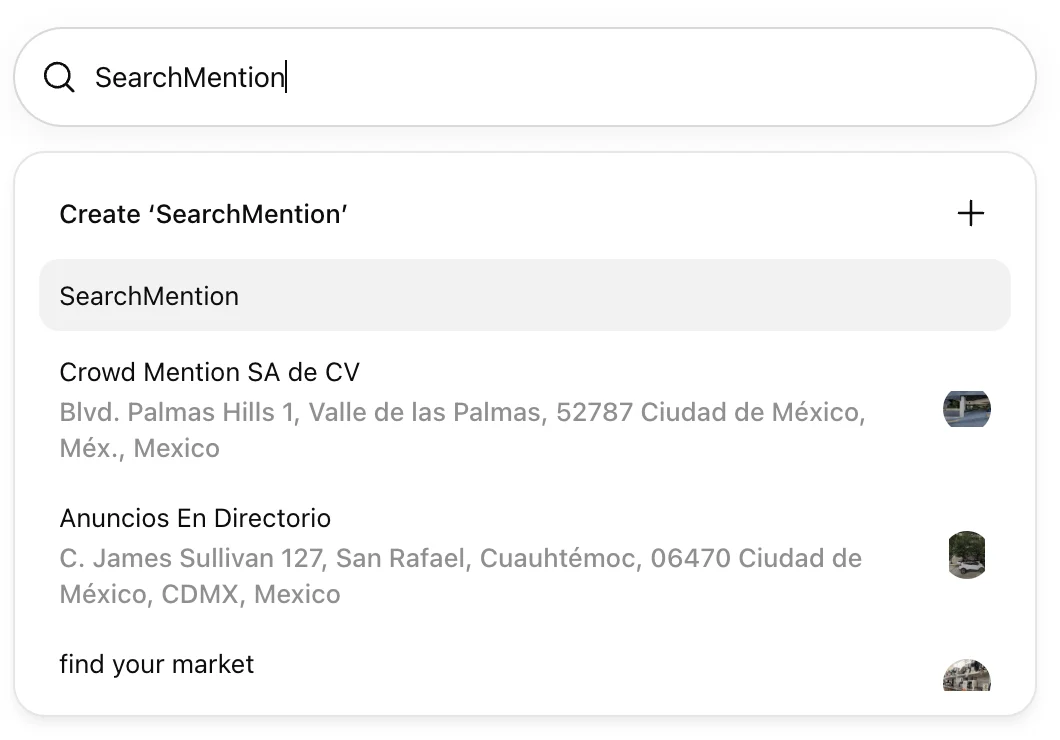
Two messages you may hit instead: Contact support means the listing is locked (common for big brands with an OpenAI account manager), and a claim invitation email means someone at OpenAI already set you up; open the personal link and sign in with that email.
2. Choose how customers reach you
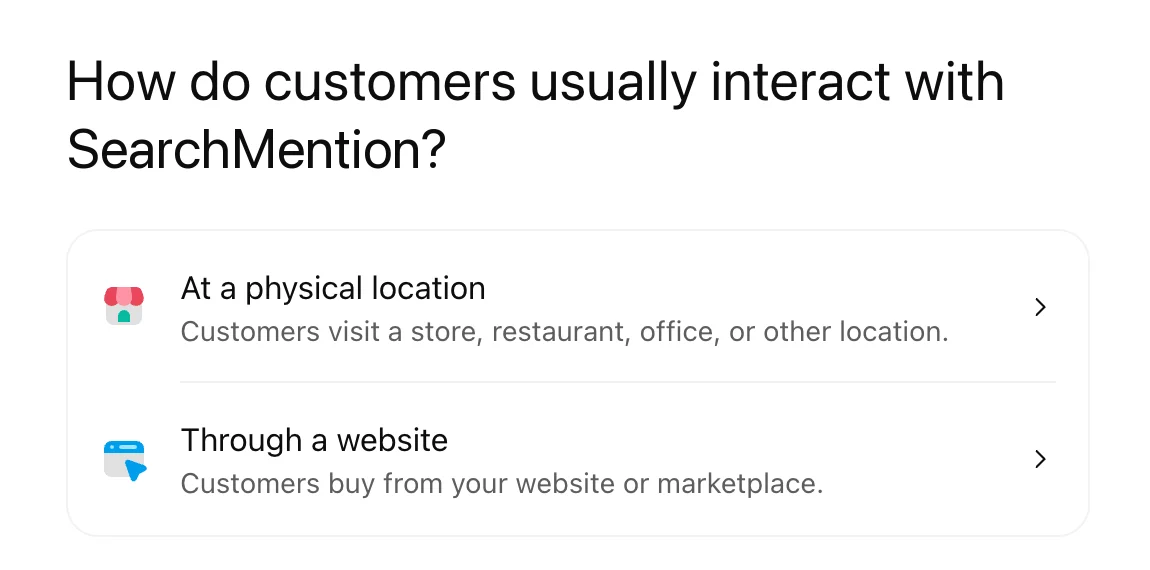
For a new profile, Business Hub asks how customers usually interact with you: At a physical location (a store, restaurant or office) or Through a website (customers buy from your website or a marketplace). The choice decides how you verify. Online stores, SaaS and service businesses pick the website path. Creating a new physical-location profile put Search Engine Journal's tester on a waitlist; local businesses can currently claim only an existing US listing.
3. Add your website and verify the domain
Enter your domain. The preview on the right starts filling in your profile card as you go.
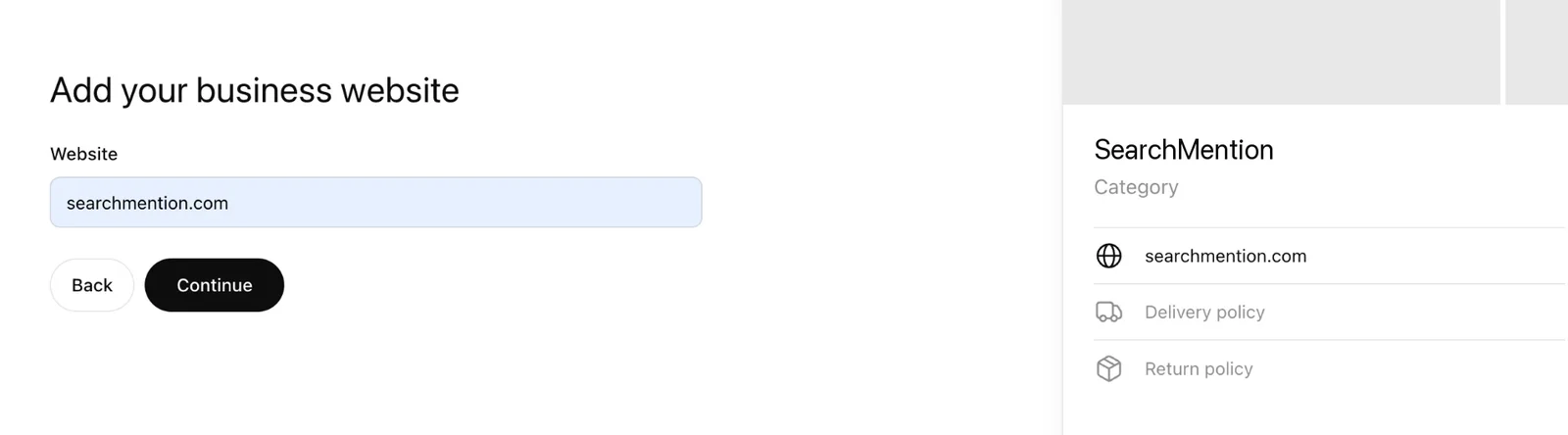
Next, ChatGPT gives you a TXT record to add to your DNS. The host (name) is openai-business-profile and the value starts with openai-business-profile= followed by a token unique to your claim. Copy both exactly.
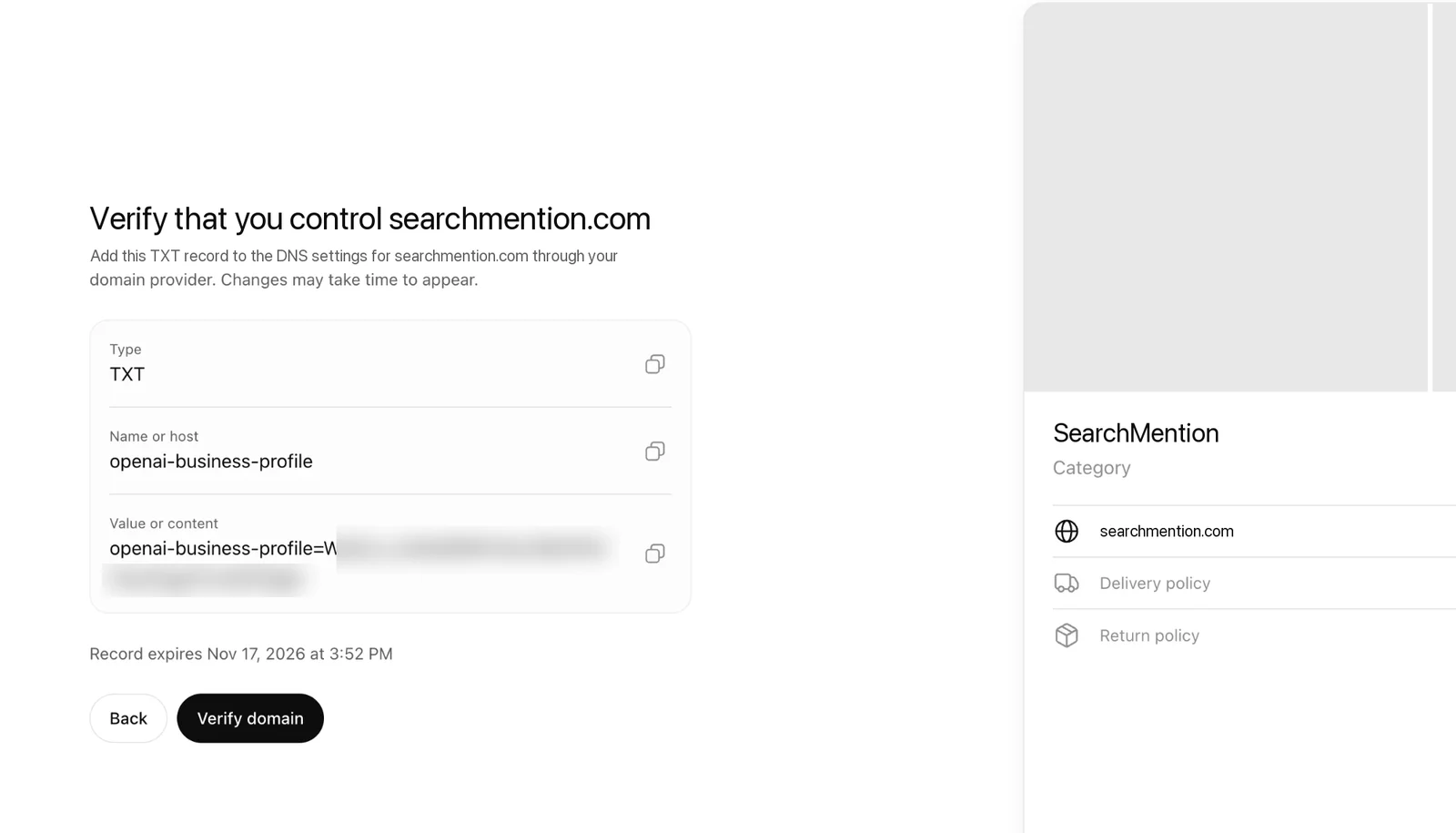
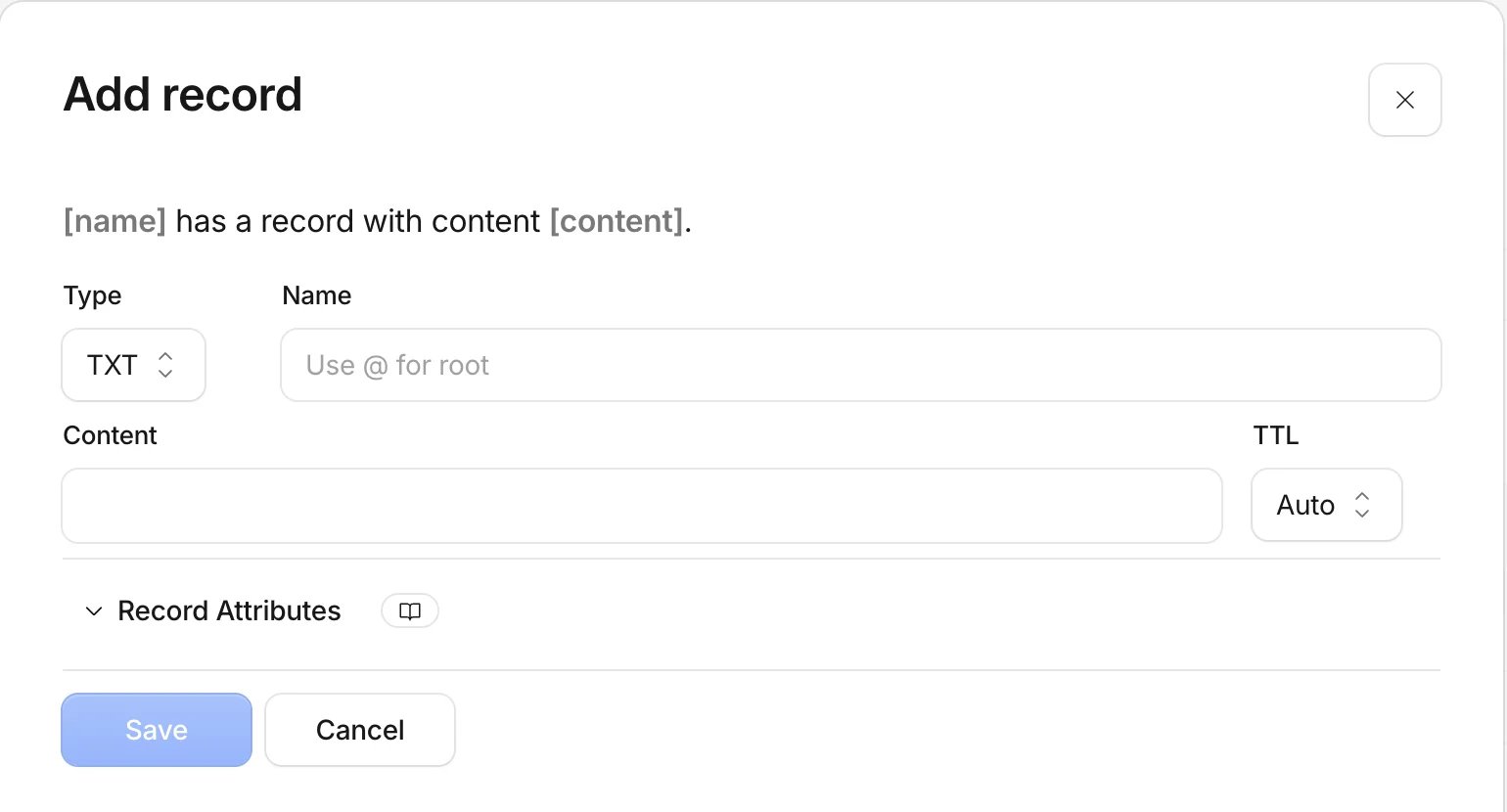
In Cloudflare, that's DNS → Records → Add record, type TXT, name openai-business-profile, and the full value (including the openai-business-profile= part) as the content. Other DNS providers have the same three fields. Some add your domain to the name automatically, so don't type openai-business-profile.yourdomain.com unless yours asks for it.
Then go back and select Verify domain. Ours failed on the first try with "We haven't verified the record yet. Check the name and value, then try again after your DNS changes appear." If the name and value match, that usually means the record hasn't propagated yet: wait a few minutes and try again. Don't wait too long, though: the record shown expires about a day after it's issued, and then you start over with a new token.
The other methods are quicker if they apply to you. Business phone sends a code by SMS or an automated call to the number on the listing, so pick a time when someone can answer. Business email sends a code to the address associated with the business. Shopify store connects your store through a Shopify login and verifies you from there; you can also start it from the Shopify admin.
4. Pick a category and describe your business
Choose a business category from OpenAI's list (we picked "SaaS company") and add an optional description. The field says it's for what you'd like customers to know "so ChatGPT can share it in conversations when helpful or relevant." Write it the way a customer would describe what you do, with the specifics that make you the right pick: who it's for, what you sell, where you ship, what it costs. Don't stuff keywords; everything you add has to follow the Businesses in ChatGPT policy.
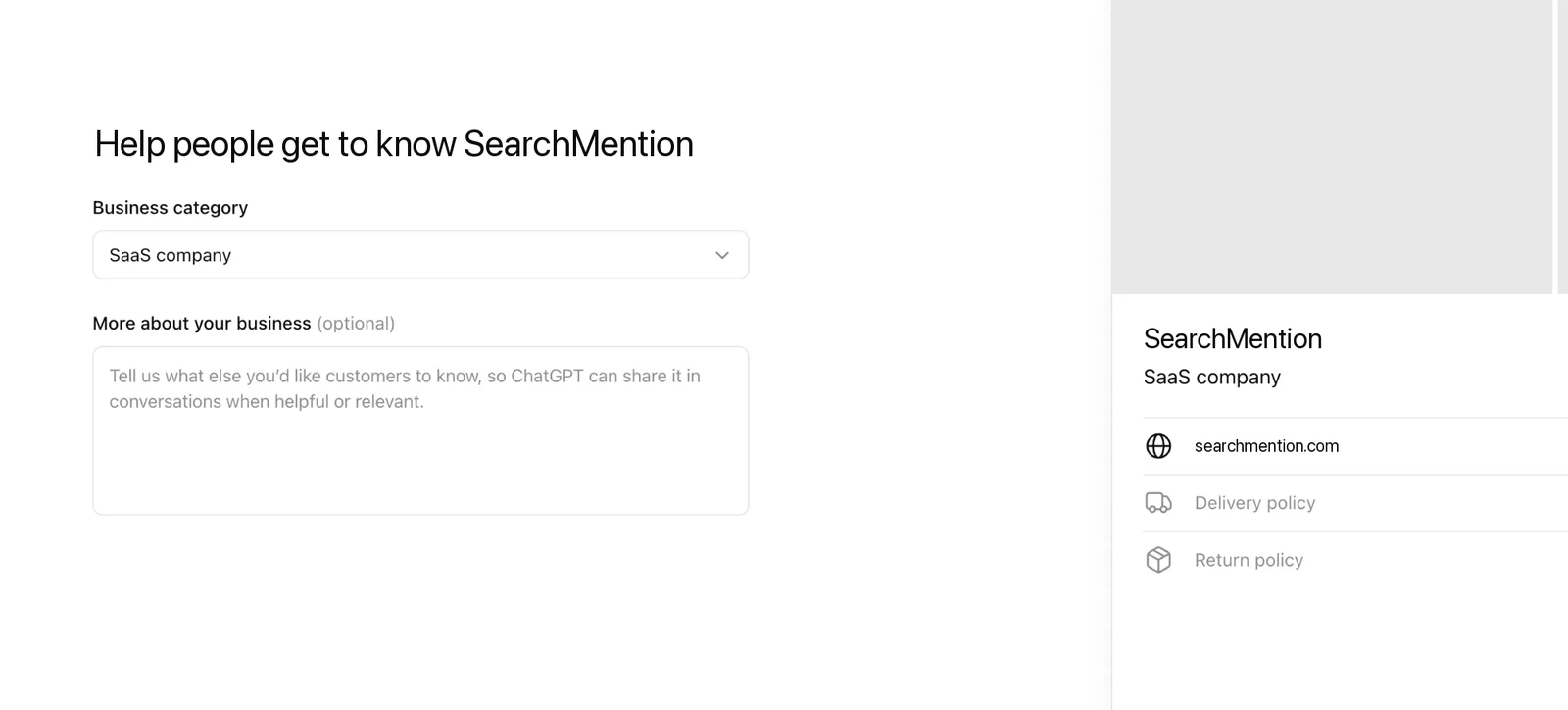
After that you can add a business email and phone (both optional), and answer two policy questions: delivery (none, paid or free) and returns (none, with fees, or free). They're written for stores; if you sell software or services, check how the answers read in the preview before you continue.
5. Your profile is saved as a draft
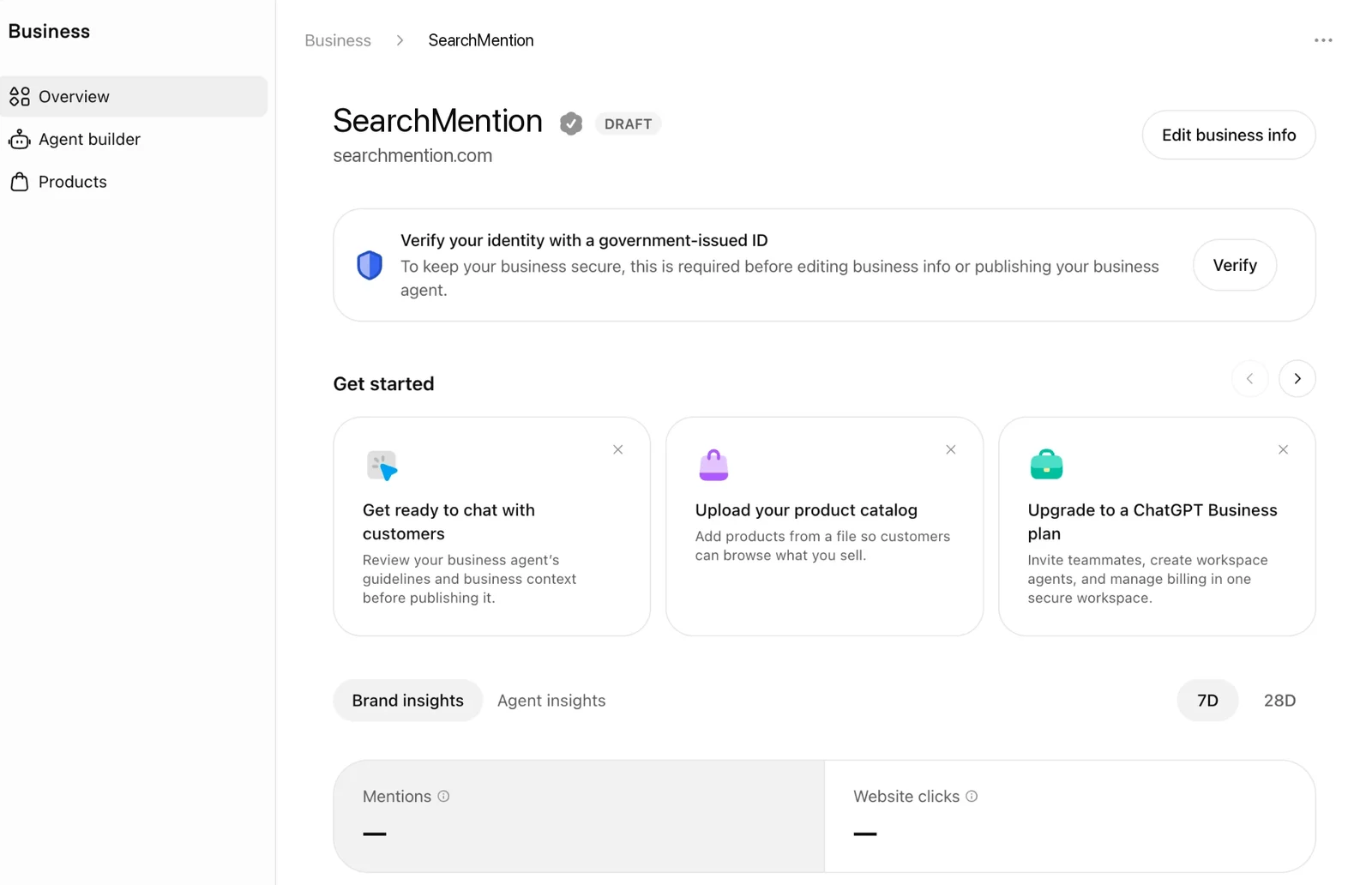
Once the domain is verified, you land on your business overview with a Draft badge. You can see everything, but you can't edit business info, publish an agent or see insights until you verify your identity. The page also offers three next steps: set up a business agent ("Get ready to chat with customers"), upload a product catalog, and upgrade to a ChatGPT Business plan. The last one is optional and unrelated to the profile; SEJ's tester also saw a $500 ad credit offer at this point.
6. Verify your identity with Persona
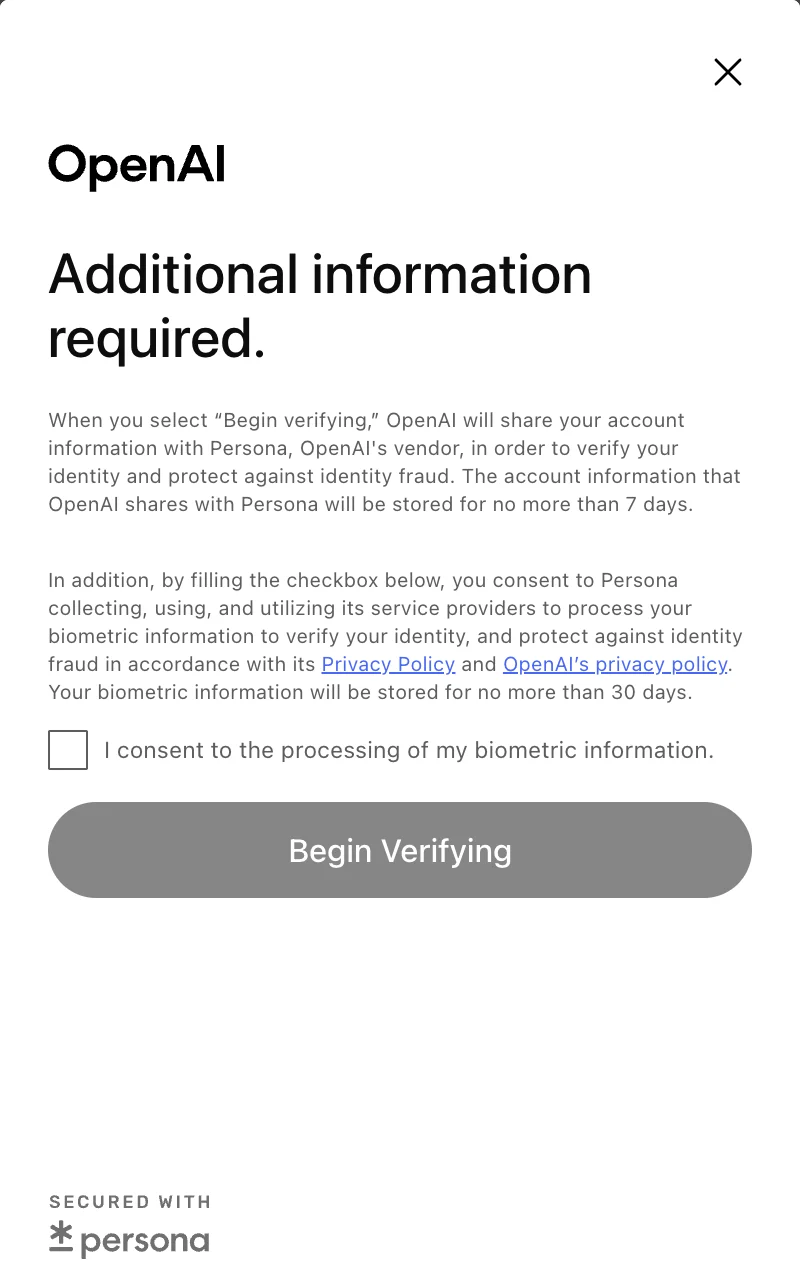
Select Verify, then Start verification. OpenAI uses Persona for this step. The consent screen says OpenAI shares your account information with Persona for up to 7 days, and Persona keeps your biometric data for up to 30 days. You pick the country of your ID and take a photo of it, on your computer or by continuing on your phone; the biometric consent means Persona compares it with your face.
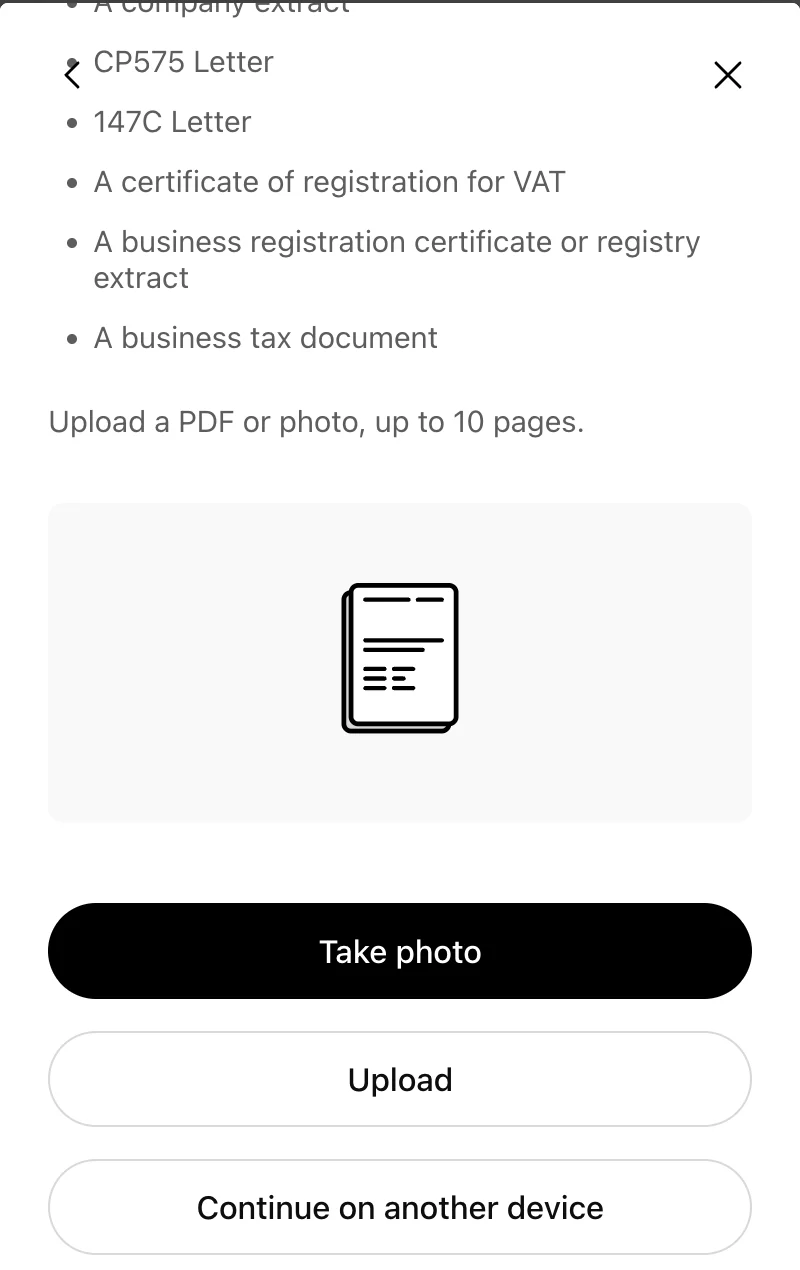
For our business, Persona also asked for proof that the business exists: a company extract, an IRS CP575 or 147C letter (the EIN confirmations US businesses get), a VAT certificate, a business registration certificate or registry extract, or a business tax document, as a PDF or photo of up to 10 pages. Use the legal name, address and number on that document everywhere else in the form.
OpenAI then reviews the submission and emails you. Review time varies; SEJ's was almost instant. Approval adds the blue check. One thing to know before you submit: if you created a new profile, approval publishes it automatically. There's no separate "publish" button for the profile itself.
7. Complete your profile
After approval, open your profile to update your website, description, category, logo, cover photo, delivery policy and return policy. OpenAI reviews changes before they go live, and it can take time for them to show up in answers, which can also draw on other sources about you. The admin who claimed the business can Invite teammates or give an agency access from the top of the overview. Each brand is managed separately; claiming the main brand doesn't claim its locations.
If you sell products: feeds and Business Agents
Product feeds. Under Products, you can upload a CSV that follows OpenAI's product feed specification, or point to a hosted feed URL, to share prices and availability. Shopify stores can connect their Shopify feed instead, and OpenAI notes that eligible Shopify products are already in ChatGPT through Shopify Catalog (we looked at what ChatGPT is told about Shopify products). WooCommerce, Magento and custom stores have to build the CSV. Products must follow OpenAI's commerce policies, and a feed "doesn't guarantee that ChatGPT recommends your products."
Business Agents. Ecommerce and online service businesses in the US can also build an agent in Agent builder that answers customers' questions about products and policies in a separate, labeled chat that people open from your profile. It can't take orders, book appointments or look up a customer's order; it explains and links to your site. You can sponsor it as the destination for ChatGPT ads. Preview it with a real customer question ("Can I return an item I bought on sale?") before you publish. Publishing is optional; the profile and insights work without it.
What Business Hub insights show (real numbers from a small site)
Insights live under Brand insights on the overview, for the last 7 or 28 days. There are three:
- Mentions. For an online business, a mention counts when a ChatGPT answer references your website. Your brand name alone doesn't count. (In our own reports we'd call that cited: one of your pages is among the pages the answer linked.) For a local business, it counts when ChatGPT shows a result for that location.
- Website clicks. How often people clicked through to your site.
- Discovery topics. The themes of answers that cited you. They're groups, not the questions people typed.
Here is FotoBookers, a photographer booking site that tracks its AI visibility with SearchMention, for November 9–15, 2026: 178 mentions (up 7.23% on the week before) and 17 website clicks, about one click for every ten mentions.
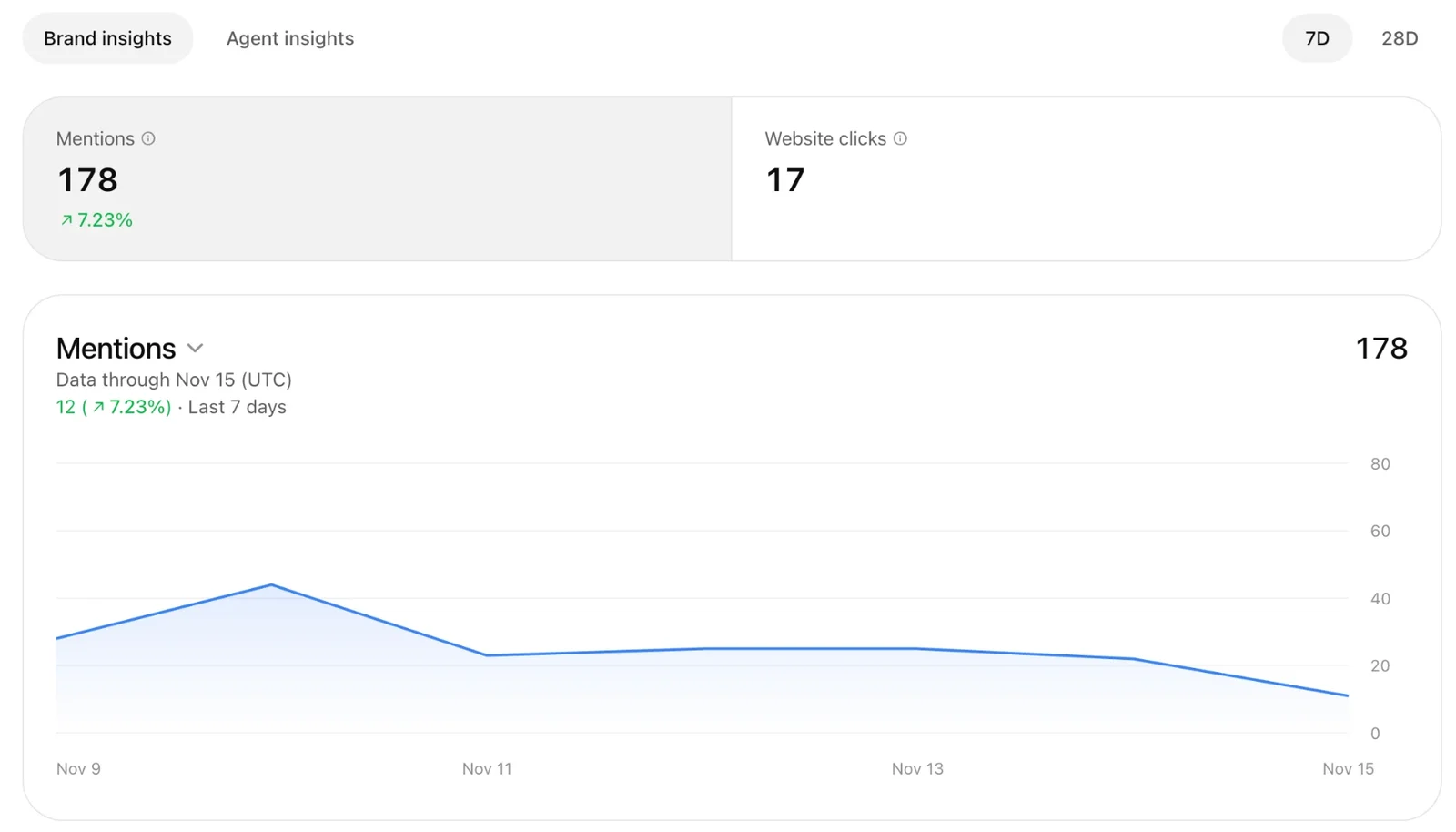
Can you trust the click count? We checked it against two other sources for the same seven days. GA4 recorded 15 sessions from chatgpt.com. SearchMention's AI Traffic log, which reads the server's requests, saw 25 page views referred by ChatGPT, which group into about 14 visits. So the 17 clicks are in line with what the site itself sees. GA4 can come in lower because visits from the ChatGPT app often arrive without a referrer and land in Direct (why ChatGPT traffic shows as Direct in GA4).
| Source (FotoBookers, Nov 9–15) | What it counted |
|---|---|
| Business Hub | 178 mentions, 17 website clicks |
| GA4 | 15 sessions from chatgpt.com |
| SearchMention AI Traffic | 25 ChatGPT-referred page views (about 14 visits) |
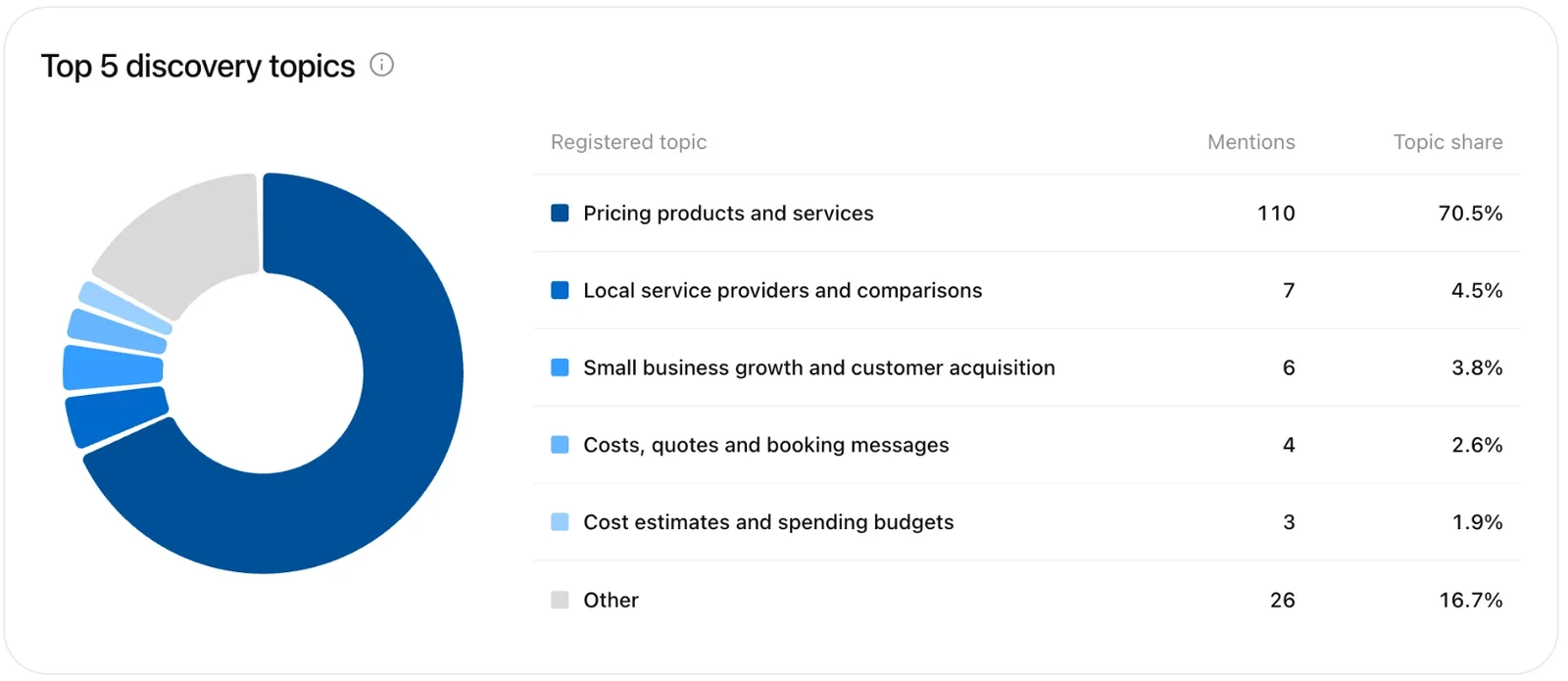
The discovery topics were less obvious. For a booking site, you'd expect questions about finding a photographer. Instead, 70.5% of the answers that cited FotoBookers (110 of 156) were about pricing products and services, far ahead of local service providers and comparisons (4.5%) and small business growth (3.8%). ChatGPT uses the site mostly as a source for what photography costs. That's useful: it says which pages earn the citations, and that keeping package prices clear and current matters more than another "best photographers" page.
If you see dashes: OpenAI says a blank metric can mean activity hasn't reached the reporting threshold, data is still being collected, or reporting isn't available, "not necessarily zero activity." A new or very small site may see dashes for a while.
What Business Hub doesn't tell you
Business Hub tells you how often. It doesn't tell you where or against whom. By design, businesses never see individual prompts or conversations. So you can't tell:
- which questions you're cited for, and which ones you're missing from;
- what ChatGPT actually said about you, including wrong prices or outdated details;
- which competitors it named instead of you, and which of their pages it cited;
- whether the answers name you without linking you (those don't count as mentions);
- anything about Google's AI Overviews, Gemini or Perplexity.
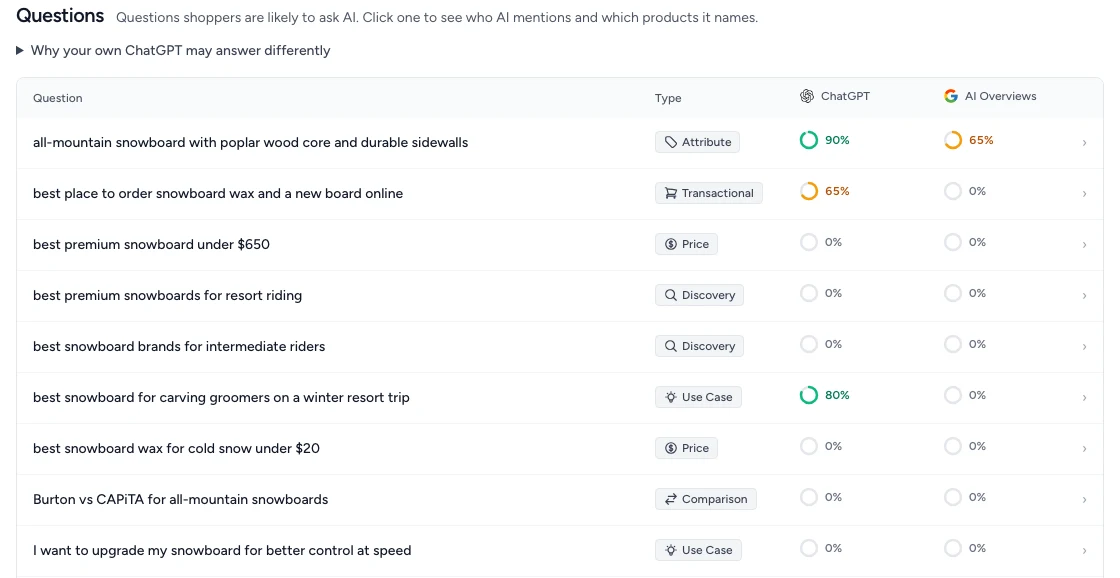
That's the gap SearchMention fills. It asks ChatGPT and Google's AI Overviews the questions your customers are likely to ask, on a schedule, and keeps every answer: whether you're mentioned, whether one of your pages is cited, and who's named instead. Here's what that looks like for a snowboard shop. Each question shows how often each engine mentioned the store:
And across all the answers, which brands AI mentions most, including the competitors you didn't know you were up against:

Business Hub would give this shop one number for mentions and a few topics. The report shows that it wins "all-mountain snowboard with poplar wood core" and is absent from every price question, and that Burton is mentioned in 80% of the answers. Those are the pages to work on next.
Use the two together. Business Hub is the official count of citations and clicks from ChatGPT. A question-level tracker tells you which answers to win next. And your analytics tell you whether those clicks turn into customers (see how to track ChatGPT referral traffic).
Does claiming your business help you show up in ChatGPT?
Not directly, and OpenAI says so: claiming "doesn't guarantee increased visibility or give you direct control over ChatGPT's independent recommendations," and advertising doesn't influence those answers either. Claiming doesn't change your listing's visibility on its own.
It's still worth doing. Your profile becomes a source ChatGPT can use for your category, description, policies and prices, so answers about you are more likely to be accurate. Your profile shows a blue check when people open it. And you get a free, official count of citations and clicks you can't get anywhere else. What earns the citations in the first place hasn't changed: pages ChatGPT can crawl (allow OpenAI's crawlers), clear answers to the questions your customers ask, and other sites that mention you (how to rank in AI search).
Frequently asked questions
How do I claim my business on ChatGPT?
Open Business Hub in ChatGPT, search for your business, claim or create it, verify by DNS TXT record, phone, email or Shopify, then pass Persona's ID check. Approval adds a blue check and unlocks editing and insights.
Is ChatGPT Business Hub free?
Yes. Claiming, editing and insights don't need an ads account or a paid plan. Ads, sponsored agents and ChatGPT Business plans are separate.
Can an online-only business create a profile?
Yes, through the "Through a website" path, verified with your domain. Google Business Profile doesn't allow online-only businesses. Local stores and restaurants can currently claim only existing US listings.
What counts as a mention?
For an online business, an answer that references your website. Your brand name alone doesn't count. A dash means not enough data yet, not zero.
Will claiming make ChatGPT recommend me more?
OpenAI says it doesn't guarantee more visibility. It makes the information about you more accurate and gives you insights.
Does Business Hub show the questions people asked?
No. You get grouped discovery topics, never prompts or conversations. To see the questions, answers and competitors, use a tool that asks ChatGPT those questions itself.
See the questions behind your mentions
SearchMention asks ChatGPT and Google questions your customers are likely to ask and shows, per question, whether you're mentioned, whether your pages are cited, and who's named instead.